RIP “Lync” … Welcome “Skype for Business”

Do not get me wrong; Microsoft did not kill the Lync product. It just rebranded it to “Skype for Business”.


Microsoft acquired Skype in 2011. Back then, it was very vague what the long-term strategy was behind having two separate products that could both do almost the same thing. When it came time to consolidate the brands, Skype’s large consumer footprint and instant familiarity made it the easy choice over Lync and a couple of days ago, Microsoft announced it:
Effective in 2015, Lync will become Skype for Business
.

Skype for Business will retain Lync’s infrastructure—the ability to use on-premises servers, optional federation with external communications networks, and so on and so forth—but the branding and client design will closely match those of Microsoft’s consumer communication platform.

Skype for Business will further improve interoperability with the consumer version of Skype. While voice and instant messaging are already interoperable between Lync and Skype (watch this video to see the interoperability in action), the next version will add video messaging and access to the Skype user directory. This will mean that, should administrators choose to enable it; the Skype for Business client software will serve as a fairly fully featured Skype client (for consumer), too.


Read the full announcement here

Office 365 Summit is coming to Dubai on Nov 17th & 18th

Just wanted to drop a quick note about an upcoming Office 365 training opportunity that is coming soon to our region:
Dubai Office 365 Summit!

The Office 365 Summit is a series of limited invitation 2 day workshops for Microsoft’s most valued customers and partners providing deep-dive readiness on all productivity workloads from Microsoft product experts.

Office 365 Summit will feature over 60 breakout sessions with 300-400 level content across IT Professional, Development, Sales & CIE, Adoption and Education tracks. During the Summit, you will have the opportunity to interact and learn from your industry peers and representatives from Microsoft and participate in hands-on learning. Select a location below and register now to secure your spot!

In addition, the Office 365 Summit site has a plethora of Readiness materials!  Get the latest training materials and technical presentations from the Office team. Download presentations from Ignite events, get links to webcasts, Labs, and find other online training resources. 


[SP24 Conference] Automated Build-Deploy-Test Workflows for SharePoint 2013 & Office 365 Using VS2013 – Slides & Video Recording

I’m glad to announce that the slide-deck & video recording for my session at SP24 Conference are now available.

For watching my session recording, click here.
For viewing the slides, click here.
For the other sessions, click here.

Announcing #SPSGulf Keynote Speaker: Ulrika Hedlund

We are pleased to announce that SPSGulf Keynote Speaker is Ulrika Hedlund. Ms. Hedlund is the founder and managing director of Business Productivity FZ LLC

Business Productivity’s mission is to help companies increase the return on investment in productivity software through enhanced user adoption. Business Productivity offers unique, scenario-based video tutorials showcasing how to effectively use productivity software in real life to get better results. Business Productivity’s training videos are targeted for today’s “YouTube” savvy workforce that are too bored and too impatient to sit through lengthy, feature-based product trainings. In order to increase employee productivity, Ulrika Hedlund strongly believes that effective use of technology must be combined with a change in behavior and work methods.

Ulrika Hedlund has spent most of her career at Microsoft. She started working for Microsoft Sweden in 1997 and ten years after that she moved to Dubai and joined Microsoft Gulf in 2007. During her years at Microsoft she has worked as a Business Intelligence Technology Specialist, Business Productivity Advisor, Information Worker Solution Specialist and Customer and Partner Experience Lead.

Ulrika Hedlund has a Master’s in Electrical Engineering from the Royal Institute of Technology in Sweden and an Executive MBA from London Business School.

Ulrika Hedlund is passionate about technology and the positive impact it can have on people’s lives. In her weekly blog, Get Sharp, she covers current technologies and explains what the benefits are of using them and how you can increase productivity in the workplace by better work methods and effective use of technology. ​

Her keynote presentation titled “Transforming the way we work” is not to be missed. You can join it from here.

Keynote : http://bit.ly/SPSGulfKeynote
Arabic Track:  http://bit.ly/SPSGulfArabic
English Track 1 : http://bit.ly/SPSGulfEng1
English Track 2 :  ​http://bit.ly/SPSGulfEng2
Password for all tracks: spsgulf


Live Online SharePoint Saturday Gulf (#SPSGulf) – Full Schedule Announced

This is just a quick note to let you know that we’ve just announced the full schedule for SharePoint Saturday Gulf (Online). If you haven’t registered, you can still register from here.

Time
(GMT

Arabic Track

English Track 1

English Track 2

10:00 – 10:50 am

Transforming the way we work
Ulrika Hedlund
(BusinessProductivity.com)

11:00 – 11:50 am (GMT+4)

SharePoint 2013 Enterprise Search
Jamil Haddadin (MVP) & Iman Al Maskari

External Collaboration with SharePoint Online and Yammer
Jasper Oosterveld (MVP)

SharePoint Infrastructure Tips and Tricks for On-Premises and Hybrid Cloud Environments
Michael Noel (MVP)

12:00 – 12:50 pm (GMT+4)

Application Lifecycle Management in SharePoint 2013 & Office 365
Ayman El-Hattab (MVP)

Optimizing the release distribution process of SharePoint 2013 to minimize the impact on farm’s availability
Gokan Ozcifci (MVP)

Kinecting with your class: An interactive learning experience for Office 365 for Education
Stefano Tempesta

1:00 – 1:50 pm (GMT+4)

Exploring SharePoint 2013 Cross-Site Publishing
Marwan Tarek

What’s new in SharePoint 2013 Service Pack 1 (SP1)?

Knut Relbe-Moe

Introduction to SharePoint Cloud Business Apps
Usama Khan (MVP)

Break
3:00 – 3:50 pm (GMT+4)

Overview of Office 365 and Yammer
Ahmed Mahmoud (MSFT)

SharePoint Branding 101: Concept to Production
D’arce Hess

The Ultimate User Adoption Cookbook: 6 recipes for success!
Eelco Vink

4:00 – 4:50 pm (GMT+4)

Client Side Rendering in SharePoint 2013
Muawiyah Shannak

Keep SharePoint “Always On”
Liam Cleary (MVP)

Self-Service Site Creation in SP 2013, with SharePoint Designer: A Case Study for a Project Management Office
Jim Bob Howard

5:00– 5:50 pm (GMT+4)

SharePoint Server 2013 as a Digital Asset Management System
Ahmed Said

Getting Started with Office 365 and Power BI
Bjoern Rapp (MVP)

Introduction to Intranet Planning
Haaron Gonzalez (MVP)

6:00 – 6:50 pm (GMT+4)

Workflow Manager Tips & Tricks
Mai Omar Desouki

SharePoint Search – An Indispensable Tool
Saifullah Shafiq (MVP)

Winning Strategies for Successful SharePoint Backup and restore
David Toyne

Join from the links below :

Keynote : http://bit.ly/SPSGulfKeynote 
Arabic Track
 http://bit.ly/SPSGulfArabic
English Track 1 : http://bit.ly/SPSGulfEng1
English Track 2 :  ​http://bit.ly/SPSGulfEng2
Password for all tracks: spsgulf


Microsoft MVP for the 5th Year in a row – This time for Office 365!

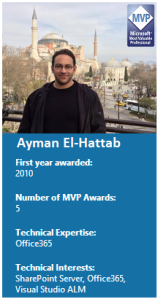
Ayman El-Hattab MVPMy MVP award anniversary this year is special and deserves its own way for celebration. A few minutes ago, I received an email from Microsoft informing me that my MVP status has been renewed for another year but this time for Office 365 rather than SharePoint Server. I’m really glad about the change in my MVP expertise because it reflects a  switch in my area of focus during the past two years. Now that Office 365 has been announced during SharePoint Conference 2014 ( #SPC14 ) to be the fastest growing product in Microsoft’s history (a title that SharePoint held for quite some time), I’m even more excited to be aligned with the direction Microsoft is heading.

If you are not familiar with the Microsoft® MVP Award (I doubt), it is an award given by Microsoft to exceptional technical community leaders who actively share their high quality, real world expertise with others. Of more than 100 million users who participate in technology communities, around 4,000 are recognized as Microsoft MVPs.


My SharePoint MVP Journey

I received my first MVP award for SharePoint Server in April 2010 and have been renewed every year since then. It has been an honor to be associated with the fastest growing product in Microsoft history (Till Office 365 eclipsed) for four years and to be part of such a vibrant, knowledgeable and helpful community. My journey with SharePoint started back in 2006 and it took me around two years to publish my first article on Code Project, the article was titled “SharePoint Delegate Controls Unclouded” and the feedback I received from my colleagues was phenomenal and was the main reason for me to start the blog that you reading now. During the past six years, I’ve been very active in the online and offline communities but I’ll give you some examples for some of the best in terms of reach and impact:

Office 365, an exciting Journey ahead …

To be honest, I was not a big fan of Microsoft BPOS offering but when Microsoft officially launched Office 365 back in June 2011, I realized that something big is happening. It took Microsoft a few years though to announce its cloud first strategy. Microsoft was clear that, at some point of time, the new features will be released to the Service (Office 365) first rather than the Server (SharePoint On-prem, Exchange On-prem, etc…).

Fast forward a few years à At Microsoft SharePoint Conference 2014, Microsoft announced the following:

  • 500% increase in Office 365 users in the last year.
  • 60 % of Fortune 500 companies are currently using Office 365.
  • Office 365 has generated $1.5 B of revenue to Microsoft in the last year.
  • 75+ new features have been added to Office 365, some of them will not even be part of the upcoming on-prem releases.
  • Office 365 is now the fastest growing product in Microsoft history.

As mentioned earlier, I dedicated some of my time and focus in 2013 & 2014 to broaden my skill-set to include the different Office 365 workloads. I saw what was coming based on Microsoft’s “Devices + Services” announcements as well as the discussions I had with the Office & SharePoint Product Teams at the global MVP summits in Seattle. I launched a YouTube channel called O365ForAll and I spoke at many events and conferences (including #SPC14) about the Cloud App Model and how to apply Application Lifecycle Management practices to Office 365 Apps. I’ve also tackled other important cloud topics for developers like Visual Studio Online & Microsoft Azure throughout my speaking engagements & blog posts.

From this point onward, you will see more focus from my side on Office 365. This doesn’t mean that I’m moving away from SharePoint. In fact, only in April, I have two important speaking engagements on my schedule:

Last but not least, I would like to thank my family, my SharePoint community friends, the amazing MEA MVP Community,  my blog followers, all those who attended my sessions and all those who helped me progress in my career. Without you guys, I would have never been able to achieve anything.

Follow me on Twitter to keep updated on my upcoming activities
Stay connected via LinkedIn
 

Speaking at SharePoint Saturday Gulf on April 12th

Title: Application Lifecycle Management in SharePoint 2013 & Office 365
Description: There are several methods to customize SharePoint. Developers have the option of creating new cloud applications for SharePoint or maintaining legacy full trust code. Coupled with the complexity many organizations have in terms of managing SharePoint customizations across Office 365 and on-premises implementations, developers and solution architects will need to understand how to adjust application lifecycle management (ALM) techniques to support and deploy quality solutions. This series of blog posts will focus on the establishment of development, testing and deployment best practices for on-prem and cloud applications and solutions. This will also include concepts such as continuous integration & automated testing.
Language: Arabic
Level: 400
Date: April 12th
Time: 12:00 PM (GMT+4)

Register for SPS Gulf from here

MEA MVP Open Day 2014 – I’m inspired!

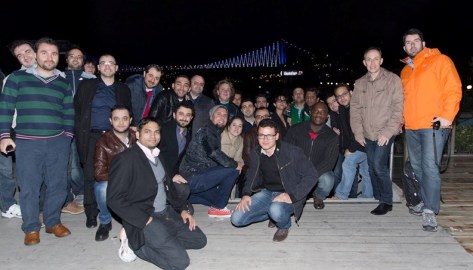
Last weekend, Middle East & Africa MVPs had their first local gathering since 2008. Although this was very close a long trip to Las Vegas to attend and speak at the global SharePoint Conference 2014, I made it to Istanbul on March 20th to attend “MEA MVP Open Day” and spend a couple of days in one of my favorite cities worldwide.

It has been an amazing event for me, not only did I get to make new friends but I also had the chance to meet some friends that I had previously met during global MVP Summits, TechEd events as well as local conferences.

During the two days, we had the opportunity to listen to great & informative talks by Aben Kovoor (MEA HQ DPE Lead), Michael Fosmire (Microsoft MVP Program Business Lead), Dariusz Zalewski (Nokia Developer Champion CEE Lead) and Ekaterina Lajintseva (International Senior Site Manager for MSDN & TechNet). We also had some MVP-to-MVP sessions and discussions, those for me were the coolest & most useful part in the two days!
Although I’ve been in the community for a long time, the MVP-to-MVP sessions in addition to our side talks inspired me to come up with new plans and work on new things:

  • I liked how Alistair Pugin (SharePoint MVP) united the efforts of the South African SharePoint User Groups & SQL User Groups to work together on joint big events, this is something that I’m planning to replicate in some of the countries that I regularly visit in Middle East & Africa.
  • I also liked how Taylor Gibb (Windows Consumer MVP) reached millions of technology users through his consumer-focused blog. Although I’m maintaining an active blog that deeply tackles many business productivity and collaborations areas, I still didn’t offer much in the consumer space. During the next months, I’ll also extend my focus to cover other products areas like Office Online, Skype and others.
  • I very much liked the personal branding tips and tricks presented by Daron Yondem (Azure MVP). Daron was kind enough to share with us very useful online services that can help boost the reach of our technology contributions. IFTTT.com & bufferapp.com are just two examples.

Besides, I enjoyed learning about some of the impactful activities in the past 12 months:

  • Yasser Makram’s (Client Dev MVP) well-received sessions at TechEd North America & TechEd Europe events.
  • Sherif Talaat’s (PowerShell MVP) two books in 1 year!!
  • Niyi Omotoyinbo’s (Directory Services MVP) contribution to the Cloud OS MVP Roadshow in Africa.
  • Ahmed Bahaa’s (Visual Studio ALM MVP) session @ MEA Visual Studio 2013 launch in Dubai.
  • And more …

Last but not least, I would like to extend a huge word of thanks to Hande Kayadeniz Torkan (MEA MVP Lead) and Sinem Eylem Arslan (Turkey MVP Lead) for putting together such a phenomenal event. Cannot wait to see you along with fellow MEA MVPs in Seattle (well, If my MVP status is renewed in April) J

Meet SP24 Conference Speakers!

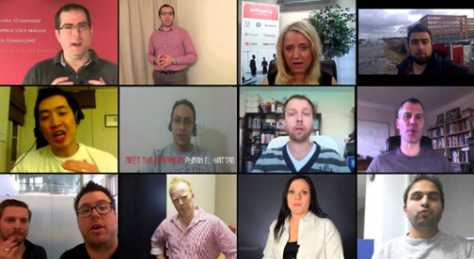
I’m so excited about SP24 Online Conference and I very much appreciate the efforts behind it. During the past two weeks, the team behind SP24 has been publishing some short videos to introduce the conference speakers and sessions. Click on the image below to watch the videos and choose the sessions that you’re most interested in attending.

As you might know, I’ll also be speaking at the conference. Below my session details:

Title: Automated Build-Deploy-Test Workflows for SharePoint 2013 & Office 365 Apps

Description
: With the introduction of SharePoint 2013, there are different methods to customize SharePoint. Developers have the option of creating new cloud applications for SharePoint or maintaining legacy full trust code. Coupled with the complexity many organizations have in terms of managing SharePoint customizations across Office 365 and on-premises implementations, developers and solution architects will need to understand how to adjust application Lifecycle Management (ALM) techniques to support and deploy quality solutions.
In Visual Studio 2013, you can create a build-deploy-test workflow to deploy and test your SharePoint apps & solutions when you run a build. Over several demos, we will cover how to get started with automating the build, deploying the resulting packages to SharePoint Virtual Testing labs using PowerShell, then automatically running automated tests against the SharePoint Applications & Solutions.

Click on one of the pictures below to watch my introductory video.

Automated Testing Challenges for SharePoint Apps – Assigning the Latest Build to the Current Test Plan!

During my SharePoint Conference session (SPC273 : Application lifecycle management in Office and SharePoint), I showed the audience how simple it’s to automate the process of building, packaging & deploying SharePoint apps by creating very basic Team Foundation Server Build Definitions. I’ve also quickly touched upon two challenges that architects and developers usually face when trying to add Automated Build Verification Tests (BVT) to the process & hence reaching a fully automated continuous deployment process.

The two challenges are:

I’ve explained the first challenge along with a trick that you can use to eliminate the manual step needed in this post. Today, I’m going to explain the second challenge and show you how to handle it.

The Challenge:

If you are using Microsoft Test Manager for testing, the “build in use” field within the Test Plan should be updated to use the specific build that your testers are going to test.

There are two main reasons for this:

  • As you proceed with testing, you might find bugs. Those bugs should be logged against a specific build for traceability & reporting reasons. For more info, please check this article.
  • Before automated tests are executed, Microsoft Team Foundation Server copies the Test Automation assemblies from the drop folder of the assigned Build to the remote testing environment where test cases would be executed. I’ve written a post and recorded a quick video last year to show how and where those DLLs are copied, you can check them out from here.

Unfortunately, There is no option out-of-the-box to automatically update the “Build in use” field to use the latest build. This means that after the SharePoint App is built, packaged, deployed & trusted, you still need to pause the testing efforts, go to Microsoft Test Manager and update this field manually to use the latest build. In case you want to add Automated Build Verification Tests (BVT) to your build definition, you will need to find a way to automate this task and that’s exactly what we are aiming for; a fully automated continuous deployment and quality assurance process.

The Trick:

The trick is simple:

  • Create a console application that uses Team Foundation Server API to retrieve the latest successful build and then assign it to the current test plan.
  • Call the console app from within your build definition (After the app is built, packaged, deployed and trusted and before test cases are executed).

Now I have a few questions to answer:

  • How can I create the console application?
    Here is some code that you can use. The code is self explanatory.
  • Where should I deploy it?
    I usually copy the output .exe to my testing environment. You can copy it anywhere, just keep in mind that it should be executed on a machine with ‘at least’ Visual Studio Team Explorer is installed.
  • How can I call it from the build definition?
    There are different options. The one I use is as follows:
    • Create a build definition based on the “Lab Default Build Process Template”
    • Copy the .exe to the testing environment.
    • Call the Console Application after the app deployment (and trust) take place and just before test cases are executed.

Once the console application is called, the “Build in use” field is updated, the latest & correct Test Automation assemblies are copied to the remote testing environment, the test cases are executed on the latest build, and the results are published and reported against it.

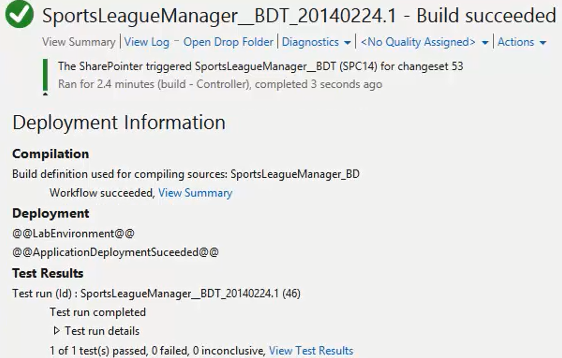
Here is an example for what you can get once a developer checks-in some code to the source control repository:

bdttr

See it in action:

To complement my #SPC14 session, I’ve recorded a 25-min video to show how to create a fully automated continuous deployment process for SharePoint Apps (Build – Deploy – Trust – Test – Report). The two challenges are handled in the video, you can watch it from here.

Quick-Hit Technology Thoughts from a Territory Manager @ Nintex, Microsoft Regional Director and 6x Microsoft MVP