All posts by Ayman El-Hattab [MVP]

Ayman El-Hattab is a Technology Evangelist @ Nintex & a recognized industry expert focusing on helping organizations plan, design, develop, build, govern and operate enterprise collaboration solutions. You can follow Ayman on Twitter @AymanElHattab to stay updated on his upcoming activities.

SharePoint Logging Library

In my article “Simplifying SharePoint Debugging By Creating the Troubleshooting Toolbox“, I have stated the following :

“I’d also like to point out that you can write code that incorporates logging to MOSS logs. Writing to the same trace log alleviates the need for developers to log their development information in other places such as the Windows Event Log, which is more commonly used by system administrators.”


Unfortunately this comes with 3 gotchas :

  1. You cannot set the log event level (e.g. low, medium, and critical) as it’ll always display the error level in the trace logs as High.
  2. Also you cannot control the trace category as it’ll always display the category as “General”.
  3. The logger is located in 12\ISAPI \Microsoft.Office.Server.dll and therefore it’s only available with the MOSS install, not WSS 3.0.

What if you need to write into SharePoint trace logs while having full control on the error level and category?

Enter SharePoint Logging Library !

  1. Get the “SharePoint Logging Library” from CodePlex.


    21

  1. Add a reference to AymanElHattab.SharePoint.Logging.dll .
  2. Add a using statement to AymanElHattab.SharePoint.Logging namespace.
  3. Use the library as follows :

    SharePointLogger.LogStartOfMethod();
    SharePointLogger.LogWarning(“Hello SharePointers”);
    SharePointLogger.LogInformation(“x = ” + x);
    SharePointLogger.LogMessageWithSeverityAndCategory(“Hi”, SharePointLogger.TraceSeverity.High, “My Category”);
    SharePointLogger.LogEndOfMethod();

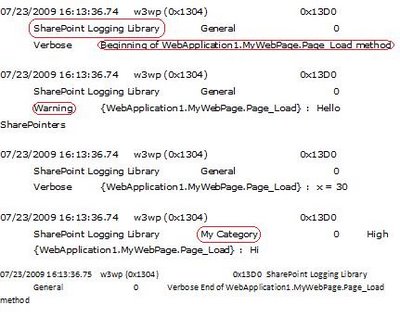
  4. Get your code executed , then open the trace logs.
22

 As you might have noticed :

  1. You can call the public methods SharePointLogger.LogStartOfMethod() and SharePointLogger.LogEndOfMethod() for writing to SharePoint Trace Logs .You don’t need to pass the method or class name, this will be automatically logged by Reflection as shown in the figure above : “Beginning of NameSpace.ClassName.MethodName Method”.
  2. You can control the severity and the category when you use the LogMessageWithSeverityAndCategory() Method.
  3. “General” is the default category when you use the methods that doesn’t accept a parameter for the category.
  4. You can log exceptions and their stack traces by passing the exception object to the public LogException() Method.

Beginning SharePoint Development Available Now!

It’s here – after a far too long wait – the next issue of Understanding SharePoint Journal.

The topic this time, as you likely know, is Beginning SharePoint Development. If you are an aspiring developer, or if you have a lot of experience as a developer on other platforms, this issue is for you.

The issue, spanning 128 pages, covers the following aspects of SharePoint development:

  • Creating the development environment
  • Overview of SharePoint from a developer’s perspective
  • SharePoint development core concepts
  • Data development in SharePoint
  • Event handlers and workflows in SharePoint
  • SharePoint web part development
  • Development of visual elements

You’ll also get 21 videos lasting more than 3 hours and 15 minutes, walking you through the steps of the exercises and showing you some additional and useful tips and tricks.

I won’t hold you here no more, here is the URL: http://www.beginningsharepointdevelopment.com/

Screencasts and Resources for SharePoint, in Arabic

In Co-operation with EndUserSharePoint.Com , I’d like to announce the first ever SharePoint series of Screencasts in Arabic recorded from Egypt SharePoint User Group meetings and presented by me. Special thanks to Mark Miller ( owner and editor of EUSP ) for being interested in the Arabic content and our activities at Egypt SharePoint User Group.
You can find here screencasts, slidedeck and photos from the most recent meeting where I spoke about SharePoint Content Types.

Session Description :“Content types are incredibly cool and fundamental to how SharePoint works with Data and Information. Is this session we’ll explore the power of custom content types development and see how we can use them for customizing the visual appearance, introducing new behaviors and much MORE “

Egypt SharePoint User Group, June 2009 Meeting

Two weeks ago, Egypt SharePoint User Group second meeting was held, Special thanks for ITWorx for hosting the event.
The sessions went really great and we had a great guest: Michael Noel, A SharePoint Guru, speaking about “Building a perfect SharePoint farm”, it was very informative and useful. Thanks Michael and I hope that you enjoyed your time in Cairo and Alexandria.

11

For me, I really had great experience speaking about my favorite topic in SharePoint “Content Types“. Firstly, I spoke about Content Types from the End User perspective, demonstrated Site Content Types and List content types then I switched to the development part where we developed Content Types using CAML and I discussed some methods to design everything from the UI and export the Content Types to Visual Studio and deploying them through “Features”.

Finally, I discussed how to customize Content Types forms and how to customize SharePoint through Content Types.
The session was very interactive and we had very nice and interesting attendees.

After my session, I’ve received many requests to share the slide deck on my blog. Sorry for the delay but finally I managed to upload it, you can get it from the following URL:
http://is.gd/1C6DW

Getting the Login Name for a Given Display Name in SharePoint

Yes, It’s possible to retrieve the LoginName of a user if you only have the DisplayName ( Last Name + First Name ).

There are a lot of ways to achieve that like :

  1. You can directly query the Active Directory.
  2. You can use a PeopleEditor control, which will grab the user if you type in the lastname, firstname combination as follows :
    PeopleEditor people = new PeopleEditor(); people.MultiSelect = false;
    this.Controls.Add(people);
    int userID = Int32.Parse((((PickerEntity)people.ResolvedEntities[0]).EntityData[“SPUserID”]).ToString());
    SPUser user = SPContext.Current.Site.RootWeb.SiteUsers.GetByID(userID);
  3. You can use SharePoint Search API ( FullTextSqlQuery Class ) :
    SELECT AccountNameFROM portal..scope()WHERE ( (“SCOPE” = ‘People’) ) AND (“Title” = ‘[DISPLAY NAME]’)

I prefer the third way, much easier.

Querying MSMQ Messages Using LINQ

In a project that I’m currently working on, I needed to retrieve messages from MSMQ based on some criteria, I used LINQ to do that and would like to share this code with you. MessageQueue messageQueue = new MessageQueue(Constants.MessageQueueName); messageQueue.Formatter = new BinaryMessageFormatter(); var TrackingRecords = from System.Messaging.Message message in messageQueue where message.Label.Contains(Constants.MessageLabel) select (ICLGRecord)message.Body; // Itterate through the Messages foreach (var TrackingRecord in TrackingRecords) { } // Remove All Items From MSMQ messageQueue.Purge();

Using Surveys on anonymous access SharePoint sites

One of the nice features of SharePoint is “Surveys”. They allow you to create a set of questions and have users of the site fill them in. It allows for selections from a set list, rating scales (where you rate a number of items along a scale from, say, ‘not at all’ to ‘extremely’) and even flow logic (where the outcome of one question causes certain questions to be skipped). For intranet-type team sites, this just works like a charm. For public sites with anonymous access however, it turns out not so easy. To fill out a form, the user must have write access to the surveys library for example. Normally, we of course never allow write access to anonymous users. This article will show you how to configure your survey for use on a public anonymous web site (it involves a little trick). Note that this tutorial applies to ALL flavors of SharePoint, both WSS 3.0 as any of the MOSS 2007 licenses.

Business Intelligence with SharePoint and Excel

Today’s business decision-makers have a distinct advantage over their predecessors when it comes to business intelligence (BI) tools that they can use for analysis, trending, and presentation of data. A good BI strategy, supported by a solid base of BI technologies, can streamline business processes while also boosting productivity and profit. The overall BI strategy of Microsoft comprises a suite of server and client-side data integration tools. Powerful analytical and reporting tools in SQL Server 2005 provide the backbone data management infrastructure, while Microsoft Office applications, specifically Microsoft Office Excel, provide the flexibility for information workers to remotely interact with centralized and secure data sources. This article, which is adapted from the Microsoft Press book Microsoft Office SharePoint Server 2007 Best Practices, focuses on how you can use Excel and Excel Services to analyze business intelligence data within SharePoint sites. http://technet.microsoft.com/en-us/magazine/2009.02.bookbi.aspx

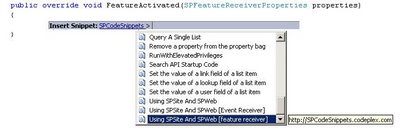
Announcing SPCodeSnippets

Didn’t you find yourself writing SPContext.Current.Site, SPSecurity.RunWithElevatedPrivileges and list.Items.Add() more than hundred times in most of your SharePoint projects ? So Why Reinvent the wheel ?

3

4

SPCodeSnippets provides the most commonly used SharePoint code snippets that follow SharePoint development best practices.

Just integrate them into your visual studio , reuse the code and speed up your SharePoint development.