All posts by Ayman El-Hattab [MVP]

Ayman El-Hattab is a Technology Evangelist @ Nintex & a recognized industry expert focusing on helping organizations plan, design, develop, build, govern and operate enterprise collaboration solutions. You can follow Ayman on Twitter @AymanElHattab to stay updated on his upcoming activities.

Egypt SharePoint User Group – January 2010 Gathering

I am more than glad to invite you to our first 2010 gathering, in January the 30th.

Event Details:

Date: January 30th 2010

Venue: Dar Al Deyafa – Ain Shams University

11:00am – 12:00 pm

Approaches and best practices : Deploying SharePoint sites through multiple environments – Mohamed Khalil

12:15pm – 1:15 pm

How to build Advanced Web Sites using SharePoint 2010 – Shady Korshed

1:15pm- 2:00 pm

Ask the Experts

About the Speakers

Mohamed Khalil (MCSD.Net, MCTS) is Technology Expert at OMS with over 6 years experience working with complex projects on Microsoft technologies. Mohamed is still very much a hands-on developer, and has participated in several large-scale web initiatives including e-commerce, WCM, intranet, back-end integration and workflow projects. Past client engagements include Bank of Scotland Plc, Microsoft Technology Center-UK, Kaplan Financial, AMCOR Artenius , and Bunzel Chemical. With a background in ASP.Net/Content Management Server/Corporate Portals, Mohamed’s current main area of focus is building public websites on MOSS and he continues to learn with every project.

Shady Korshed is a SharePoint MVP who has participated and joined huge successful projects in Microsoft Content Management Server 2002 and MOSS 2007.  Shady is into research, investigation in technologies and he is also ready for a challenging game in chess.

Please Register here

The First Arabic SharePoint Session Ever at SharePoint Saturday, Acknowledgments

[[Cross-post from EndUserSharePoint.com]]

And the SharePoint community continues to prove its uniqueness and awesomeness.

This weekend, at SharePoint Saturday EMEA, I conducted the first ever Arabic SharePoint Saturday session. The session was first scheduled for 9:00 AM GMT+0, but due to some technical reasons (the Hyper-V server hosting my virtual machine had some connectivity issues), it was rescheduled to 11:00 AM. That really depressed me and I expected to have less attendees than the other session running in parallel but I was impressed to see that the number was not affected and the attendees exceeded what I anticipated.

I can still recall the first time I recorded a session from the Egypt SharePoint User Group, June 2009 meeting and made it accessible online. The reaction and the support of the SharePoint community was marvelous and unparalleled! Mark Miller wrote a complete post about it, Mike Walsh showed great support to the idea through his blog and I received wonderful feedback even from non-Arabic speaking SharePoint folks congratulating me and urging me to record more sessions. The same happened onceSharePoint4Arabs.com was officially launched. The number of retweets, announcements, and blog postsreferring to it really surpassed my expectations.

Before leaving you to benefit from the other great articles available at EndUserSharePoint, I would like to extend special thank-you’s  to some people that really supported and spread the word regarding SharePoint4Arabs.com, Egypt SharePoint User Group and my ARABIC session at SharePoint Saturday EMEA. The list includes but it is not limited to the following folks:

  1. Mark Miller
  2. Hammad Rajjoub and Ronald Widha (DotNetMEPodCast )
  3. Joel Oleson
  4. Hanan AbdelMeguid  ( LINKdotNET CEO )
  5. Emad Alashi
  6. Kailash Kalyani (MSFT)
  7. Ruari Plint  (MSFT)
  8. Saed Shela and Huthaifa Afanah (Palestine SharePoint User Group)

And of course, no tribute to the community is inclusive without my colleagues at SharePoint4Arabs.com, Marwan Tarek and Mohamed Yehia.

For the first time : Arabic session at SharePoint Saturday!!

Throughout my blog, twitter account and Facebook, I had wonderful opportunities to get connected to a lot of nice guys in the middle east and especially in the Arabia and one thing noticed in common is the thirst for SharePoint knowledge. Moreover, I have been lately receiving many requests for more Arabic Content at SharePoint4arabs.com so cheer up guys, I have good news for you!

As you might know, I’ll be speaking at SharePoint Saturday EMEA on January 23rd. The good news is that for the first time ever, there will be a session delivered in Arabic. I’m really glad to be the speaker and hope to see you all there. (Please spread the word)

Here is a brief description of my session.

3


For the list of speakers and sessions, click here.

If you haven’t registered yet, click here.

Speaking at SharePoint Saturday EMEA

2I would love to announce that I’ll be speaking at SharePoint Saturday EMEA on January 23rd, 2010. I’ll be co-presenting “Implementing Multi-Lingual Solutions on SharePoint 2010” with my colleague, friend and mentor Marwan Tarek. I’m really happy and proud to have my name along with those highly visible names in the SharePoint community.

I’m also happy to announce that there will be great Arabic SharePoint Experts speaking for the first time at SharePoint Saturday like Mohamed YehiaMostafa Arafa and Muhanad Omar.

For the list of speakers and sessions, click here.

If you haven’t registered yet, click here.

Associating Workflows to SharePoint 2010 External Lists

I’m a real fan of SharePoint 2010 composites, so since the beta version came out, I have been playing a lot with most of the features of BCS, SharePoint Designer 2010 Reusable workflows, Access Services and others.

While I was preparing a demo about BCS and External Lists for Egypt SharePoint User group, I noticed that you cannot associate workflows to SharePoint external lists. I double checked that with some Microsoft guys and I reached to a conclusion that SharePoint 2010 External lists doesn’t support the automatic triggering of Workflows however using custom actions ( which could by easily created now using SharePoint Designer 2010) can do the trick, in other words, clicking a button on the ribbon on an external list and triggering a workflow could be a workaround.

What if you in a real need to automatically trigger workflows for external data ? you can create a SharePoint list with external data columns and treat your list as any native SharePoint list. However, be informed that External data is a little bit different from external lists in the way it’s only copy of the external data but you can always refresh it manually.

I would also like to highlight another feature, you can now author SharePoint workflows that access external data through external lists or external data columns. Brilliant!

Four reasons TO directly query SharePoint logging database

Remember my post “Five reasons not to directly query SharePoint databases” ? I have cautioned you more than once throughout it NOT to directly query SharePoint databases and I have mentioned its disadvantages and problems. If you haven’t read this post, I would encourage you to do that before carrying on.

I’m not contradicting myself! The first post was all about SharePoint 2007 but now I’m talking about the new and the amazing 2010 version of SharePoint.

So you might be asking “What the hell is SharePoint Logging Database?”  Good question!

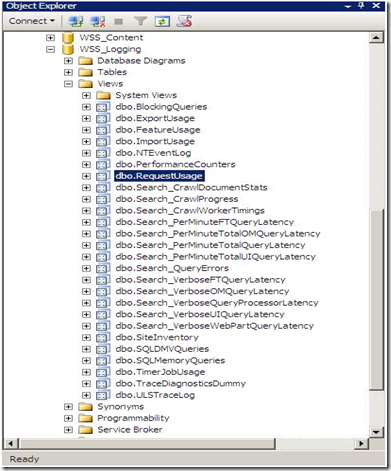
To answer you, please fire up the SQL Management Studio, and expand your databases. You’ll notice a new one named WSS_Logging.
1

SharePoint 2010 keeps tracks of everything it does by logging into the WSS_Logging Database. It  aggregates all of the raw logging data accumulated in the text files under the 14 hive and imports it into this wonderful logging database. This is the ONLY database in SharePoint that Microsoft will be happy to let the developers directly read, query and build reports against it. There is a bunch of useful views at your disposal, the one that I will show you now is  the “RequestUsage” View.

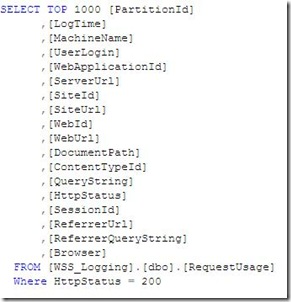
Every time a user visit generates a page request, a record is inserted into one of the partitioned tables in this database and the “RequestUsage” view is kind enough to union all the data in the partitioned tables and presents it to you to consume in your custom solutions (Web Parts, Reports, Application Pages,…). An example is shown below :
2


Let’s dive a little bit deeper to see what happens behind the scenes and where this data come from.

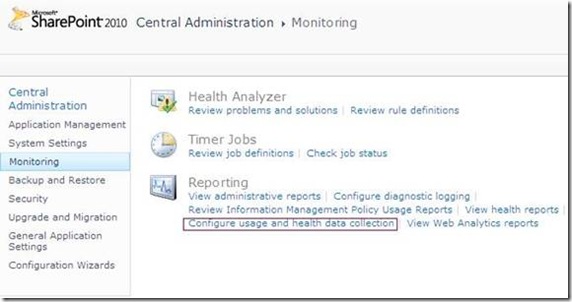
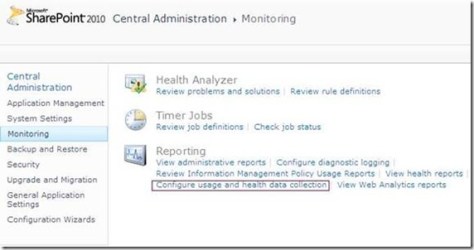
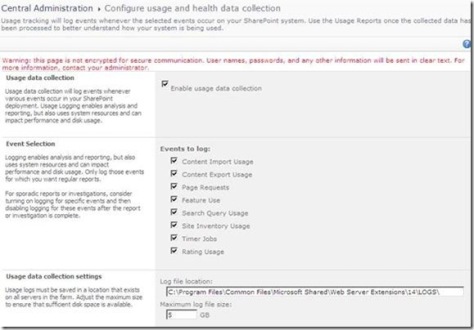
1)  Navigate SharePoint 2010 Central Administration > Monitoring > Configure usage and health data collection.
3

4


5


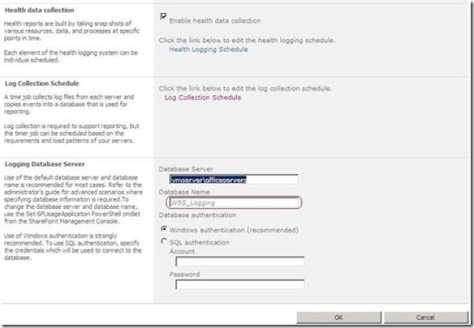
3) Did you notice the “Log Collection Schedule” section ? This implies that there is a timer job that collects  the log files located under the 14 hive and copies the events you specify into your logging database which can be employed later for reporting purposes. You can even schedule this timer job based on the load patterns of your server as you will see in the next step.

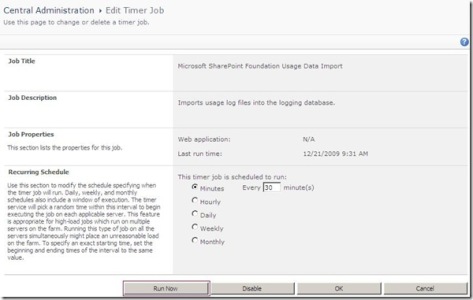
4) I have opened up my favorite troubleshooting tool ( SharePoint Manager) 2010) to track this job. As you can see in the figure below, I have configured the “Microsoft SharePoint Foundation Usage Data Import” job from the central administration to run every minute.
8

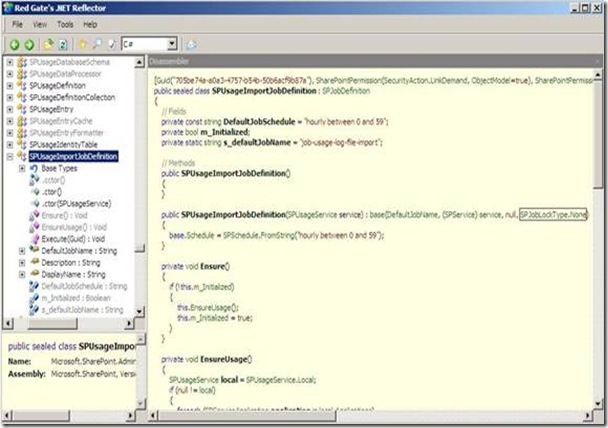
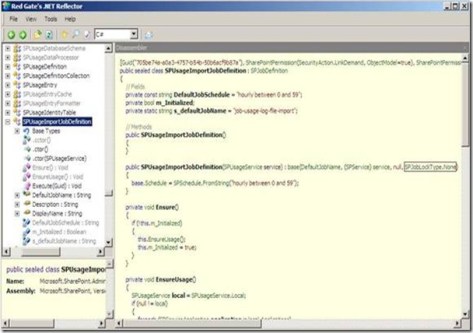
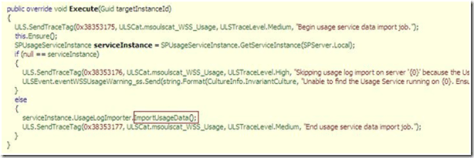
5) Out of curiosity, I have decided to use .NET Reflector to check out how this timer job works, I have noticed two things.
9

The first one is that the Job lock type specified in the constructor is SPJobLockType.None which instructs the Timer Service to run this job on all the Web Front Ends in the farm, this makes sense!

The difference between the Job and the None LockTypes is that the Job LockType ensures that the timer job only runs on one server but the None ensures that the job runs on every server.
10

Forcing the Execution of Timer Jobs in SharePoint 2010

Since you are here, You have probably read my Understanding SharePoint Journal bonus issue about SharePoint troubleshooting or my blog post “Forcing the execution of timer jobs” where I discussed debugging custom timer jobs.

That’s what I have written four or five months ago:

“You will probably need to execute your timer jobs outside of their scheduled times when you are developing, troubleshooting, or testing your custom timer jobs. Unhappily, this is not possible from Central Administration, but you can work around that using the SharePoint object model”

Of course this was all about SharePoint 2007 but NOW in SharePoint 2010, Microsoft has made it easier for us, you can directly force the execution of any timer job by just pressing a button! Awesome!

1


“People who suffered from this limitation in SharePoint 2007 will really appreciate this…

Data-Centric Composites (Mashups) in SharePoint 2010 [EGYSUG, Dec09 Meeting]

7


Last Saturday, I was happy to deliver another SharePoint 2010 talk for Egypt SharePoint User Group members. My session, titled “Data-Centric Composites (Mashups) in SharePoint 2010), focused on the following topics:

1) What is a composite ?
2) What is a mashup ?
3) Business Connectivity Services
4) XSLT Data Views, The ultimate mashup tool.
5) SharePoint Designer 2010.

We also had two other sessions by Mohamed Mosaad who gave a brief overview on the SharePoint topology and Mohamed Yehia who spoke about the new and the amazing “Access Services in SharePoint 2010”.

8


9


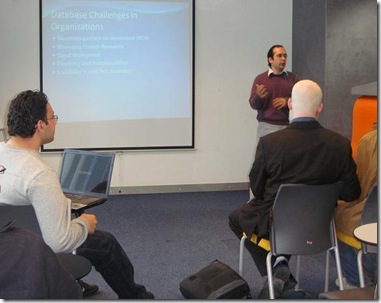
I loved how the audience was enthusiastic and interactive. I would like to thank them all for their amazing feedback and interactivity during the session, your feedback guys means  a lot to us.