Category Archives: SharePoint 2010

Speaking at SharePoint Saturday Jordan

A couple of days after I have announced SharePoint Saturday ArabiaMuhanad Omar [SharePoint MVP andone of the very active 141SharePoint experts in the region] announced the first SharePoint Saturday in the middle east. The event will be hosted in Amman, Jordan featuring an international line-up of world-class speakers, including Michael Noel and Joel Oleson.

I am really glad to be one of the event speakers and to meet Joel Oleson and Michael Noel for the second time ( first time was in Egypt SharePoint User Group sessions ).

My Session Details :

Title : “Introducing SharePoint Designer 2010!”
Description : SharePoint Designer 2010 is the core and the only design tool for designing, prototyping, and customizing both SharePoint Server 2010 and SharePoint Foundation 2010 sites, from small sites to enterprise-level internet sites and intranets.
In this session, you will learn how to :

  • Customize a site from the early stages of prototyping and design to the final deployment phase
  • Build powerful workflows and align them to your business processes
  • Integrate and present external data into SharePoint sites
  • Create and manage Data Views and Data Sources
  • Use InfoPath 2010 to customize SharePoint List Forms

SPS Jordan is your premier event for SharePoint 2010 content, so make sure you register for this great event! http://www.sharepointsaturday.org/jordan

SharePoint Saturday Arabia

4I am really pleased to announce that Registration is now open for participation in Live Online SharePoint Saturday Arabia. By registering for this event, you are confirming you would like to view the live presentations, presented from 7:00am to 3:00pm (GMT+0), on March 27, 2010.

In order to hear the presenters, you will need headphones or computer speakers. There will be no conference call dial-in phone numbers.

The live blogging platform will allow for real time questions to be passed to the presenters. There will be multiple sessions running simultaneously so that we can present to a diversified audience with different technical needs. ( Till now we are planning for two channels, one in Arabic and the other in English ).

As you register, we would very much appreciate it if you would spread the word to your SharePoint colleagues.

Thank you for joining us. With your participation, we hope to make this an exceptional event.

Register here ..

Associating Workflows to SharePoint 2010 External Lists

I’m a real fan of SharePoint 2010 composites, so since the beta version came out, I have been playing a lot with most of the features of BCS, SharePoint Designer 2010 Reusable workflows, Access Services and others.

While I was preparing a demo about BCS and External Lists for Egypt SharePoint User group, I noticed that you cannot associate workflows to SharePoint external lists. I double checked that with some Microsoft guys and I reached to a conclusion that SharePoint 2010 External lists doesn’t support the automatic triggering of Workflows however using custom actions ( which could by easily created now using SharePoint Designer 2010) can do the trick, in other words, clicking a button on the ribbon on an external list and triggering a workflow could be a workaround.

What if you in a real need to automatically trigger workflows for external data ? you can create a SharePoint list with external data columns and treat your list as any native SharePoint list. However, be informed that External data is a little bit different from external lists in the way it’s only copy of the external data but you can always refresh it manually.

I would also like to highlight another feature, you can now author SharePoint workflows that access external data through external lists or external data columns. Brilliant!

Four reasons TO directly query SharePoint logging database

Remember my post “Five reasons not to directly query SharePoint databases” ? I have cautioned you more than once throughout it NOT to directly query SharePoint databases and I have mentioned its disadvantages and problems. If you haven’t read this post, I would encourage you to do that before carrying on.

I’m not contradicting myself! The first post was all about SharePoint 2007 but now I’m talking about the new and the amazing 2010 version of SharePoint.

So you might be asking “What the hell is SharePoint Logging Database?”  Good question!

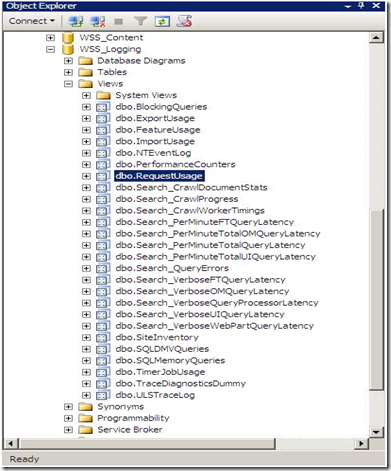
To answer you, please fire up the SQL Management Studio, and expand your databases. You’ll notice a new one named WSS_Logging.
1

SharePoint 2010 keeps tracks of everything it does by logging into the WSS_Logging Database. It  aggregates all of the raw logging data accumulated in the text files under the 14 hive and imports it into this wonderful logging database. This is the ONLY database in SharePoint that Microsoft will be happy to let the developers directly read, query and build reports against it. There is a bunch of useful views at your disposal, the one that I will show you now is  the “RequestUsage” View.

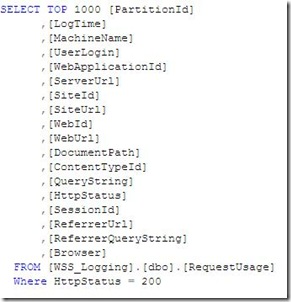
Every time a user visit generates a page request, a record is inserted into one of the partitioned tables in this database and the “RequestUsage” view is kind enough to union all the data in the partitioned tables and presents it to you to consume in your custom solutions (Web Parts, Reports, Application Pages,…). An example is shown below :
2


Let’s dive a little bit deeper to see what happens behind the scenes and where this data come from.

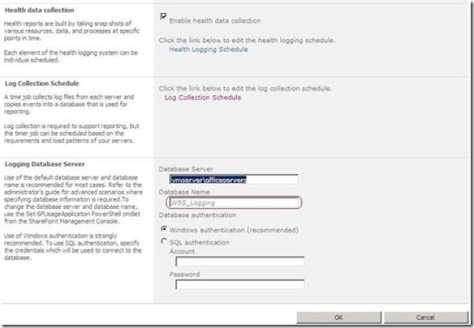
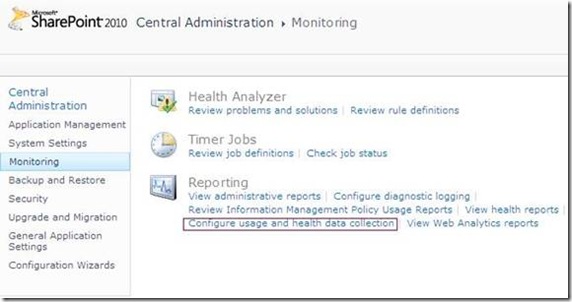
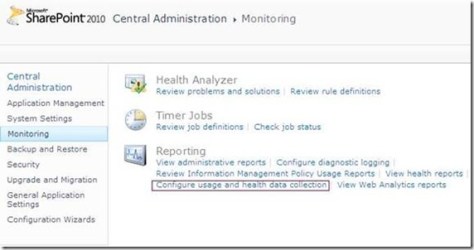
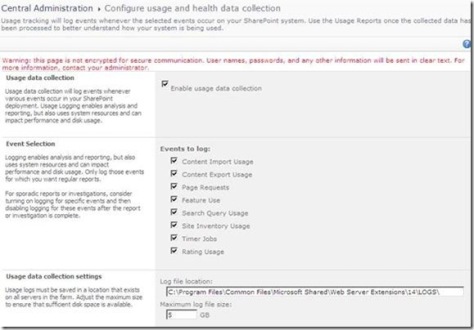
1)  Navigate SharePoint 2010 Central Administration > Monitoring > Configure usage and health data collection.
3

4


5


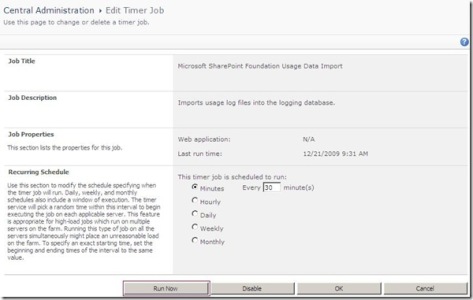
3) Did you notice the “Log Collection Schedule” section ? This implies that there is a timer job that collects  the log files located under the 14 hive and copies the events you specify into your logging database which can be employed later for reporting purposes. You can even schedule this timer job based on the load patterns of your server as you will see in the next step.

4) I have opened up my favorite troubleshooting tool ( SharePoint Manager) 2010) to track this job. As you can see in the figure below, I have configured the “Microsoft SharePoint Foundation Usage Data Import” job from the central administration to run every minute.
8

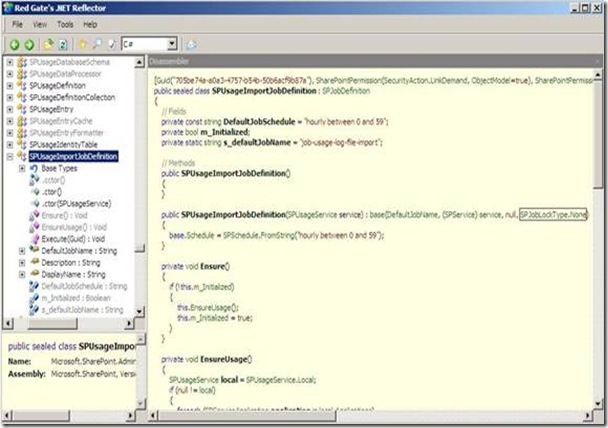
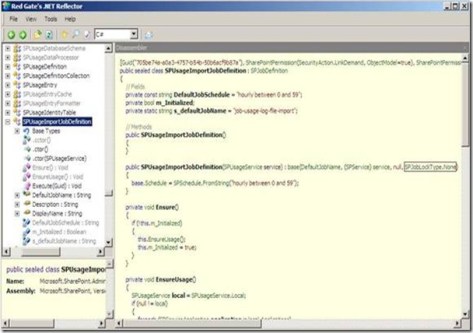
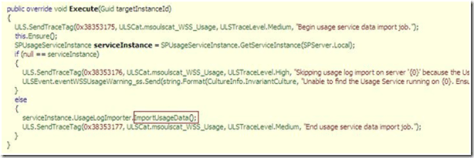
5) Out of curiosity, I have decided to use .NET Reflector to check out how this timer job works, I have noticed two things.
9

The first one is that the Job lock type specified in the constructor is SPJobLockType.None which instructs the Timer Service to run this job on all the Web Front Ends in the farm, this makes sense!

The difference between the Job and the None LockTypes is that the Job LockType ensures that the timer job only runs on one server but the None ensures that the job runs on every server.
10

Data-Centric Composites (Mashups) in SharePoint 2010 [EGYSUG, Dec09 Meeting]

7


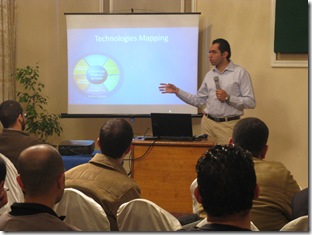
Last Saturday, I was happy to deliver another SharePoint 2010 talk for Egypt SharePoint User Group members. My session, titled “Data-Centric Composites (Mashups) in SharePoint 2010), focused on the following topics:

1) What is a composite ?
2) What is a mashup ?
3) Business Connectivity Services
4) XSLT Data Views, The ultimate mashup tool.
5) SharePoint Designer 2010.

We also had two other sessions by Mohamed Mosaad who gave a brief overview on the SharePoint topology and Mohamed Yehia who spoke about the new and the amazing “Access Services in SharePoint 2010”.

8


9


I loved how the audience was enthusiastic and interactive. I would like to thank them all for their amazing feedback and interactivity during the session, your feedback guys means  a lot to us.

Egypt SharePoint User Group – December 09 Gathering

6Egypt SharePoint User Group is glad to invite you to its December 2009 Gathering which will be held on Saturday, Dec 19th at Microsoft Egypt – Smart Village. This time, we have a valuable speaker that you shouldn’t miss, Mohamed Mosaad(SharePoint PFE, MEA). This is a great opportunity to benefit from his expertise in MOSS 2007 installations and implementations.

Please find below the event schedule

Time

Topic

Speaker

11:30am – 12:30 pm

MOSS 2007 Administration

Mohamed Mosaad

12:30pm- 12:45 pm

Break

12:45am – 1:45 pm

Data-Centric Composites in SharePoint 2010

Ayman El-Hattab

1:45pm- 2:00 pm

Break

2:00pm -3:00pm

Access Services in SharePoint 2010

Mohamed Yehia

Please Register here …

About the Speakers

Mohamed Mosaad is SharePoint Premier Field Engineer (PFE), Micorsoft MEA, with extensive experience in SharePoint administration and implmentations.

Mohamed Yehia has been diligently working in the development of enterprise solutions using Microsoft SharePoint technologies  including SharePoint Portal 2003, MOSS 2007 and currently 2010.  Mohamed is a Technical Architect and is Microsoft Certified Professional since 2001, MCSD, MCAD and MCTS Charter Member in SharePoint technologies.    He participated in a lot of Events for CuttingEdge Club and Egypt SharePoint User Group.  Twitter : @mohdyehia

Ayman El-Hattab: is a SharePoint Developer, Speaker and author. He is a Microsoft Certified Solution Developer as well as a Microsoft Certified Technology Specialist in SharePoint configuration and development. Ayman writes articles about topics in relation to SharePoint and related technologies for online magazines, publicly speaks for numerous user groups and offline communities, organizes events and conferences for EGYSUG, founder of SharePoint4Arabs.com and you will always find him active at MSDN forums and on Twitter @aymanelhattab

SharePoint 2010 TechDay!

Last Saturday, Egypt SharePoint User group and .NetWork user groups organized SharePoint 2010 TechDay, it was a full day of new SharePoint features, we started at 10:30 AM and we finished at 5:00 PM.

1


Marwan Tarek started with “SharePoint 2010, Getting Ready!” exploring the new and exciting features of SP2010

2


Mohamed Yehia followed him by “Developer tools for SharePoint 2010” in which he introduced Visual Studio 2010 SharePoint tools, LINQ for SharePoint and Client Object Model.

3


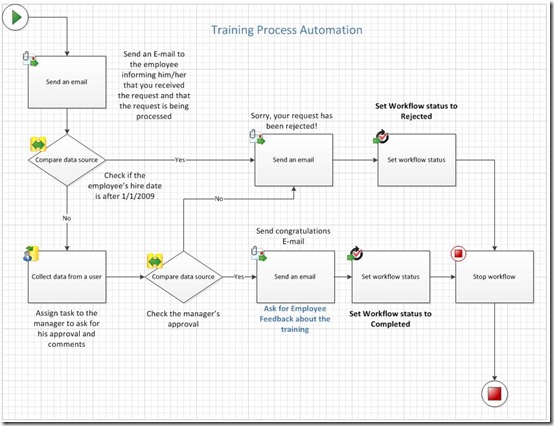
Finally, I presented “Developing No Code SharePoint 2010 Solutions”, I have created an end-to-end no code Training Request Solution in which I featured the following

5


1. SharePoint Designer 2010 enhancements.
2. SharePoint Designer Workflows
3. Visio 2010
4. InfoPath 2010 Integration with SharePoint 2010
5. Data View Web Parts & XSLT list View Web Parts
6. Using JQuery with SharePoint

I would like to seize this opportunity to extend a special thank-you to all our attendees, their interaction and questions really made my day!

I would also like to thank my colleagues Marwan Tarek and Mohamed Yehia for their wonderful sessions , Good job guys!

A feature that I really appreciate in InfoPath 2010 and SharePoint 2010

2Microsoft heard our feedback guys and took them very seriously regarding the portability of the solutions created in the development environments. You can now take all the lists, libraries, site assets, data and forms, package them up all into one file and easily deploy them onto different environments!

Now, the question is “What about InfoPath forms?”

In InfoPath 2010, all the links you have to external data are now relative, so when you move that form to different environments, those links will continue to work.. I really appreciate this!

SharePoint 2010 Developer Dashboard Visualizer

SharePoint 2010 Developer Dashboard Visualizer is a jQuery-based solution that extends the Developer Dashboard by plotting an interactive diagram with data from the Developer Dashboard, giving you an **instant** insight into where the bottlenecks are in your code.

Get SharePoint 2010 Developer Dashboard Visualizer from here and let me know what you think!

Reusable and Globally Reusable Workflows in SharePoint 2010

“SharePoint Designer Workflows” is nothing new, we’ve had that in 2007 as well. In SPD 2007, workflows were not reusable. Once you have defined a workflow, you cannot move that workflow to another list or reuse it somewhere else.

NOW in SharePoint 2010, this is possible! You can create reusable workflows and attach them to more than one list.

“Reusable workflows” is one of the coolest features in SharePoint 2010, however when I opened up SPD for the first time, I was a bit confused because I noticed two different terms “Reusable Workflows” and ‘Globally Reusable Workflows”.

1


When you create a Reusable workflow in SharePoint Designer 2010, it’s by default reusable within the site it has been created in, which means that it can be attached to any list within this site. But what if you want your workflow to be reusable in the whole site collection ? Well, this is the definition of “Globally Reusable Workflows”. You can easily convert your workflows to be available anywhere in your site collection by opening your workflow and clicking on “Convert to Globally Reusable” from the ribbon as shown below.

2


3


Also it’s worth mentioning that only the workflows created at the root level of the site collection can be converted to be Globally Reusable but other ones created in sub sites cannot. Try to create a workflow in a sub site , open it and note that the Conversion button is dimmed.

4


Another important question is what if I want to take my workflow and give it to somebody else in a different site collection? There’s another button in the ribbon called “Save as Template”, this takes the workflow, put it in a wsp file and save it to the ‘Site Assets” library. You can export this file and deploy it to other site collection and what’s really cool is that you can import this wsp into Visual Studio and extend it over there. Very cool stuff! Thanks Microsoft for this  feature!

6


7