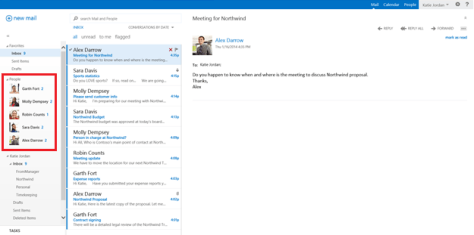
That’s a super cool feature in Outlook Web App that will be rolled out during a few weeks, the snapshot below summarizes it all !

Read more about it here ..
That’s a super cool feature in Outlook Web App that will be rolled out during a few weeks, the snapshot below summarizes it all !
Read more about it here ..
Today’s app is one of the currently featured apps in the store and is called “Document Shared With Me” . It works on both SharePoint On-prem and SharePoint Online. You can watch the video from here.
Generally speaking, the app “Documents Shared with Me” provides a holistic overview of all documents shared with the logged-in user. Thus the user is automatically informed of shared documents without leaving the current working context.
All documents shared in public libraries, e.g. on SkyDrive Pro, are listed in the app. The listed content in the app allows a direct interaction with the particular user. Because of this, the user doesn’t have to open the MySite or SkyDrive to get an overview of all shared documents.

Another great feature is that users can select what will be displayed in the “Documents Shared with Me” App. In this case users can enable documents shared from specific users, for instance.
Also Watch:
“TOP OFFICE 365 APPS” – NAPA Development Tools – Part 1
“TOP OFFICE 365 APPS” – NAPA Development Tools – Part 2
“TOP OFFICE 365 APPS” – NAPA Development Tools – Part 3
“TOP OFFICE 365 APPS” – SP2 CAML Query Tester
“TOP OFFICE 365 APPS” – Mavention Profile Completeness
Today’s App is : “Mavention Profile Completeness”. It’s actually one of my favorite apps. You can watch the video from here.
Mavention Profile Completeness helps you to encourage your users to fill in the blanks on their profile. By confronting them with real-time statistics on how far their profile is completed your users will have an incentive to fill in missing information. Mavention Profile Completeness empowers users and helps them to achieve a full and active profile, making it quicker to find talent and colleagues within any given organization. By providing triggers to fill in missing information Mavention Profile Completeness strives to improve engagement and awareness on your intranet. Also, it’s worth mentioning that the app works on both SharePoint on-premise and SharePoint Online.

Also Watch:
“TOP OFFICE 365 APPS” – NAPA Development Tools – Part 1
“TOP OFFICE 365 APPS” – NAPA Development Tools – Part 2
“TOP OFFICE 365 APPS” – NAPA Development Tools – Part 3
“TOP OFFICE 365 APPS” – SP2 CAML Query Tester

Today’s app is “SP2 CAML Query Tester” which is another useful & free app for Developers.
As a developer, testing CAML queries can be a challenge, especially in SharePoint apps. With this new free app from SharePoint MVP Corey Roth at SP2, you can quickly test your queries within the app web or in the host web. Simply install this app, and add the App Part to your host web and you can quickly test your queries without having to redeploy your code multiple times. This tool is a must have for any developer writing complex CAML queries using the SharePoint Client Object Model.
You can watch the video from here..
Also Watch :
“TOP OFFICE 365 APPS” – NAPA Development Tools – Part 1
“TOP OFFICE 365 APPS” – NAPA Development Tools – Part 2
“TOP OFFICE 365 APPS” – NAPA Development Tools – Part 3
In the previous videos, we have created our very first SharePoint app using NAPA and today we are going to export the project to Visual Studio 2013 and extend it by adding some SharePoint artifacts. You can watch the video from here.
 Presenter: Ayman El-Hattab, MVP
Publisher : O365ForAll.com
Language : Arabic
Also Watch:
“TOP OFFICE 365 APPS” – NAPA Development Tools – Part 1
“TOP OFFICE 365 APPS” – NAPA Development Tools – Part 2
“TOP OFFICE 365 APPS” is a new video series in which I’ll be covering, explaining and reviewing some ofthe coolest and most beneficial apps available in the Office 365 SharePoint app store.
NAPA Developer Tools is the first app in our series, I’ve already introduced NAPA and showed you how to install it in the first video. In today’s video, I’ll show you how to develop your first SharePoint App using JSOM (Java Script Object Model) using NAPA. You can watch the video from here.

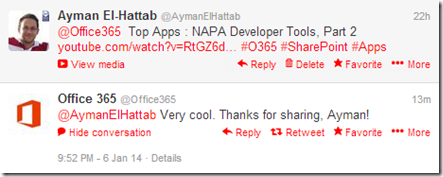
And here’s Office 365 Team feedback :
Also Watch :
“TOP OFFICE 365 APPS” – NAPA Development Tools – Part 1
“TOP OFFICE 365 APPS” is a new video series in which I’ll be covering, explaining and reviewing some of the coolest and most beneficial apps available in the Office 365 SharePoint app store.

I decided to start with NAPA because it’s very popular among developers. It will most probably take me 3 or4 videos to briefly explain NAPA.
Today’s video is Part 1 and is mainly for Introducing NAPA and demonstrating its installation process in Office 365 Tenants.

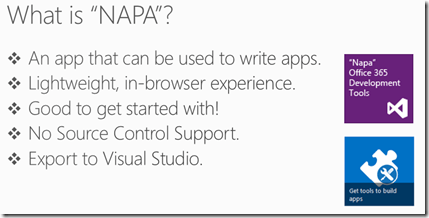
You can watch the video from here.
Remote PowerShell is the administrative interface that enables you to manage your Microsoft Exchange Online organization from the command line. This video explains how you can create a remote Shell session to connect to, manage and modify your Office 365 Exchange Online organization.

Presenter : Ayman El-Hattab, MVP
Publisher : O365ForAll
Language : English
For the Arabic version of the video, please click here.
For more Office 365 Videos, please check http://www.O365ForAll.com
Remote PowerShell is the administrative interface that enables you to manage your Microsoft Exchange Online organization from the command line. This video explains how you can create a remote Shell session to connect to, manage and modify your Office 365 Exchange Online organization.
Presenter : Ayman El-Hattab, MVP
Publisher : O365ForAll
Language : Arabic
For the English version of the video, please click here.
For more Office 365 Videos, please check http://www.O365ForAll.com
Office 365 Lync Online can help individuals within an organization to effectively communicate and collaborate. It can also let people add Lync or Skype users outside their organization to their list of Lync contacts. This could be partners, suppliers or even family members. Watch this video to learn more.

Presenter : Ayman El-Hattab, MVP
Publisher : O365ForAll.com
Language : English
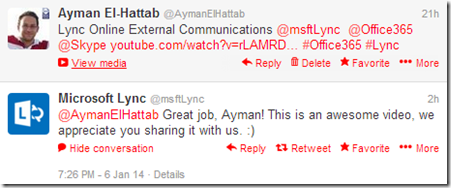
And here is the feedback I received from Microsoft Lync Team:
For the Arabic version of the video, please click here ..
For more Office 365 Videos, please check http://www.O365ForAll.com
 Ayman El-Hattab's Technology Blog