Category Archives: SharePoint 2010

New features in Office Web Apps

Yesterday, Microsoft Office Web Apps team introduced very cool new features to the web apps (Word, Excel, PowerPoint and OneNote).

In a nutshell, the new features are :

  1. Now in Excel Web Apps, you can add line, bar, pie, and many other charts to your excel speadsheets just from the browser.
  2. Drag and copy formulas and data just as you do in Excel.
  3. View Excel spreadsheets on your mobile browser. (Similar experience to Word and PowerPoint on mobile).
  4. Insert Clip-arts to PowerPoint presentations (from office.com).
  5. Embed a PowerPoint presentation or Excel spreadsheet in a blog or website. With PowerPoint presentations, viewers can page through a mini version of the slides or view in full screen.
  6. Now you can open Office files on your desktop directly from SkyDrive. Microsoft added this feature after seeing that over 90% of the Office documents on SkyDrive are created in Office on the desktop. Making it easier to work with those files just makes sense.

For more about the new features, demos and videos, refer to this post.

Indexing files larger than 16 MB in SharePoint 2010

Tonight, I came across an interesting blog post by Fellow MVP, Todd Klidnt in which he explains how to work around the 16 MB limitation for file indexing in SharePoint 2010 using PowerShell.

“As with previous versions of SharePoint, SharePoint 2010 will not index the contents of files larger than 16 MB. There are a couple of reasons for this such as network usage pulling large files across and the time it takes to break them apart”. Click here to continue to the post.

SPQuery to External List ignores the RowLimit attribute

Using CAML Queries is the only supported way to query external lists. It comes in very handy If you want to retrieve external data within a sandboxed application, without using a full-trust proxy. However using CAML Queries with external lists comes with some gotchas. Consider the following snippet :

SPQuery query = new SPQuery();
query.Query = “<Method Name=’ReadList’ />” +
“<OrderBy><FieldRef Name=\”CustomerID\”/></OrderBy>” +
“<RowLimit Paged=\”TRUE\”>10</RowLimit>” +
“<Aggregations Value=\”Off\”/>”;

SPListItemCollection items = lstCustomers.GetItems(query);

Unfortunately, this query just ignores the RowLimit and returns all the data from the external data source and not only the first 10 items as specified in the query. This is a known issue!

For more information :

http://social.technet.microsoft.com/Forums/en-US/sharepoint2010programming/thread/7a86ba74-ea19-42f3-bde9-690542c84552

Browsing PowerPivot Generated Cubes in SQL Server Management Studio

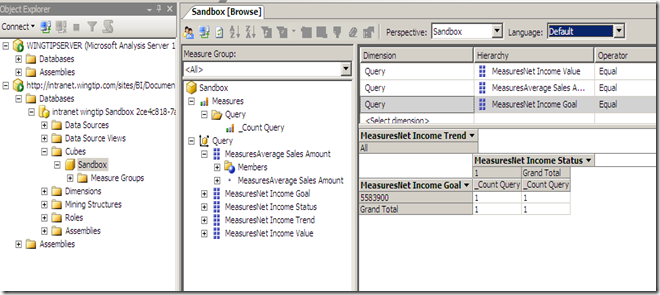
When publishing Excel Workbooks that contains PowerPivot objects, a real Analysis Services cube is generated on the fly, you don’t believe me?

1. Install the PowerPivot Add-in for Excel 2010 and use it to create a workbook.

2. Publish the workbook to a document library which is marked as a trusted data source (Unlike MOSS 2007, All SharePoint sources are trusted by default in SharePoint 2010 as shown below).

6


3. Open SQL Server Management Studio, click Connect > Analysis Services and type the URL of the workbook you just published and click Connect.

7


8


Interesting, eh ?


Excel Services limitations and workarounds

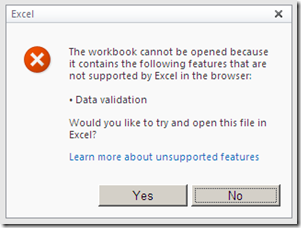
Yesterday, while presenting about Business Intelligence using SharePoint 2010 Excel Services, we came across the data validation limitation. NOTE: Excel Access Web Part refuses to load a published Excel workbook that contains Data Validation.

5

Here are couple of interesting articles that are worth reading:

1) A PivotTable Trick That Brings Data Validation to Excel Serviceshttp://blogs.msdn.com/b/excel/archive/2008/02/13/a-pivottable-trick-that-brings-data-validation-to-excel-services.aspx

2) Unsupported Features in Excel Services
http://msdn.microsoft.com/en-us/library/ms496823.aspx

Cannot Refresh or Filter Data in Published Workbooks [Excel Services – SharePoint 2010]

As shown in the screenshot below, I was trying to consume data from SQL Server Analysis Services cube using Excel 2010 Pivot Table.

1

Refreshing and filtering data worked as expected on the client but when I published my workbook to Excel Services, filtering and slicing produced the following error

2

“The data connection uses Windows Authentication and Excel Services is unable to delegate user credentials.”
Of course, the workbook existed in a trusted location and the external data connection file resided in a trusted connection library.

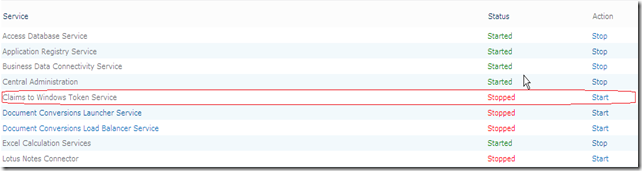
To solve this issue, I navigated to the Central Administration and started “Claims to Windows Token services” as shown below :

3

4


This allowed me to refresh data using Windows Authentication…


Cool Stuff : All up Business Intelligence Demo – Release 9.2

Microsoft has developed a comprehensive Business Intelligence solution demo (version 9.2) using SQL Server 2008 R2, Microsoft Office 2010 and SharePoint 2010 technology. This solution enables Business Intelligence for everyone at Contoso (fictional company created by Microsoft) through familiar tools, self–service capabilities, and access to critical business information.

There are two ways to access this demo solution, online remote access to server configured by Microsoft or via configuring virtual machine locally.

The Demo Release 9.2 has been made available on the Microsoft Partner site for download.  There are 42 files in the download (around 29 GB in all, once extracted though over 80).  Need some serious RAM and of course Hyper-V for it to work.

Key Features:
• SharePoint 2010 Insights, PerformancePoint Services, Excel Services, Visio Services, Reporting Services, Search, Social Relevance, Communities, Team Sites, People Profiles, Blogs, Organizational Browser, Workflows
• Silverlight, integrated with Bing Maps for the Enterprise and SQL Server Analysis Services
• Office 2010 Web Applications, Excel Co-editing
• PowerPivot for SharePoint, Excel
• PowerPivot Management Dashboard
• Report Builder 3.0
• SQL Server 2008 R2 DB Engine

Get it from here: http://www.mssalesdemos.com

For more info : http://bisqlserver.rdacorp.com/2010/03/all-up-bi-demo-release-92.html

Microsoft SharePoint 2010 MCPD & MCITP Certifications

Last month, I took the beta exams for SharePoint Server 2010. Over the last week, the results for these have been declared. I’m really glad to say that I have passed the exams. That gives me the right to use the following logos:

6

7


8


For those who are not aware of SharePoint 2010 Certifications, Microsoft now offers two separate tracks namely MCPD for Developers and MCITP for IT Professionals each containing two exams. For more information about the exams and how to prepare yourself for them, check Razi’s post here.

Replacing Signout.aspx in SharePoint 2010

Yes, this was a common requirement in SharePoint 2007 and there wasn’t an easy and supportable approach to achieve that. Now in SharePoint 2010, it’s as easy as calling a method, specifying the page that you want to replace (for instance: Signout, error, access denied, ..) ,the URL of your new custom page and that’s it!

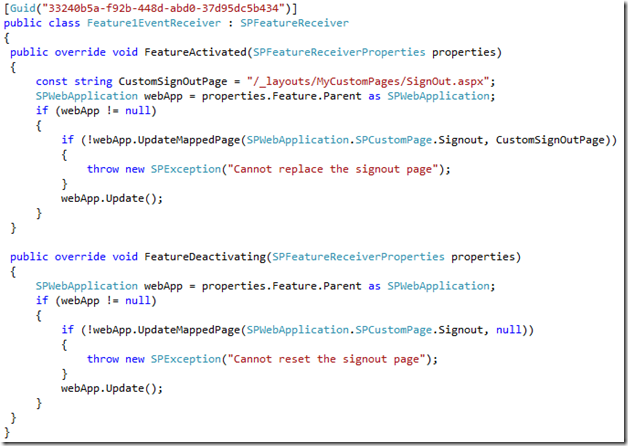
The following feature receiver replaces the default SignOut page with a custom one on activation and resets the SignOut page to the default one on deactivation.

1


You can also replace other pages like AccessDenied.aspx, Confirmation.aspx, Error.aspx, Login.aspx, ReqAcc.aspx, SignOut.aspx or WebDeleted.aspx by specifying a member of SPWebApplication.SPCustomPage enum.

Interesting, eh ?

Setting status messages from the server side using SPPageStatusSetter

As you might know, in SharePoint 2010, you can add status messages in the OOB status bar that renders just below the ribbon and the top navigation menu. There are lots of useful blog posts and tutorials showing how you can achieve that in javascript using SharePoint 2010 UI Framework. However, there is almost no tutorials or enough documentation about SPPageStatusSetter class which enables you to add status messages and achieve the same level of control from the server side using the powerful .NET server side languages.

Here is how you can do that using C# , the code is self-explanatory.

4


And here is the result:

5


Also note that SPPageStatusSetter class is in Microsoft.SharePoint.WebControls namespace which means that it’s not available in SandBoxed solutions.