All posts by Ayman El-Hattab [MVP]

Ayman El-Hattab is a Technology Evangelist @ Nintex & a recognized industry expert focusing on helping organizations plan, design, develop, build, govern and operate enterprise collaboration solutions. You can follow Ayman on Twitter @AymanElHattab to stay updated on his upcoming activities.

Egypt SharePoint User Group – December 09 Gathering

6Egypt SharePoint User Group is glad to invite you to its December 2009 Gathering which will be held on Saturday, Dec 19th at Microsoft Egypt – Smart Village. This time, we have a valuable speaker that you shouldn’t miss, Mohamed Mosaad(SharePoint PFE, MEA). This is a great opportunity to benefit from his expertise in MOSS 2007 installations and implementations.

Please find below the event schedule

Time

Topic

Speaker

11:30am – 12:30 pm

MOSS 2007 Administration

Mohamed Mosaad

12:30pm- 12:45 pm

Break

12:45am – 1:45 pm

Data-Centric Composites in SharePoint 2010

Ayman El-Hattab

1:45pm- 2:00 pm

Break

2:00pm -3:00pm

Access Services in SharePoint 2010

Mohamed Yehia

Please Register here …

About the Speakers

Mohamed Mosaad is SharePoint Premier Field Engineer (PFE), Micorsoft MEA, with extensive experience in SharePoint administration and implmentations.

Mohamed Yehia has been diligently working in the development of enterprise solutions using Microsoft SharePoint technologies  including SharePoint Portal 2003, MOSS 2007 and currently 2010.  Mohamed is a Technical Architect and is Microsoft Certified Professional since 2001, MCSD, MCAD and MCTS Charter Member in SharePoint technologies.    He participated in a lot of Events for CuttingEdge Club and Egypt SharePoint User Group.  Twitter : @mohdyehia

Ayman El-Hattab: is a SharePoint Developer, Speaker and author. He is a Microsoft Certified Solution Developer as well as a Microsoft Certified Technology Specialist in SharePoint configuration and development. Ayman writes articles about topics in relation to SharePoint and related technologies for online magazines, publicly speaks for numerous user groups and offline communities, organizes events and conferences for EGYSUG, founder of SharePoint4Arabs.com and you will always find him active at MSDN forums and on Twitter @aymanelhattab
SharePoint 2010 TechDay!

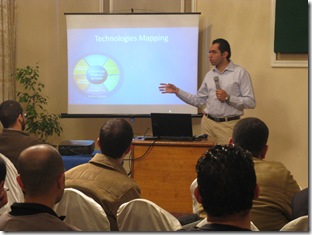
Last Saturday, Egypt SharePoint User group and .NetWork user groups organized SharePoint 2010 TechDay, it was a full day of new SharePoint features, we started at 10:30 AM and we finished at 5:00 PM.

1


Marwan Tarek started with “SharePoint 2010, Getting Ready!” exploring the new and exciting features of SP2010

2


Mohamed Yehia followed him by “Developer tools for SharePoint 2010” in which he introduced Visual Studio 2010 SharePoint tools, LINQ for SharePoint and Client Object Model.

3


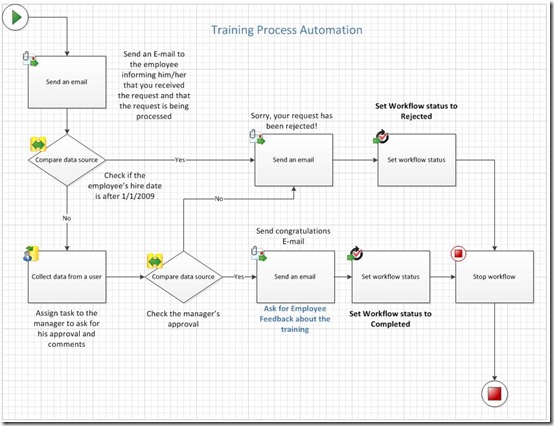
Finally, I presented “Developing No Code SharePoint 2010 Solutions”, I have created an end-to-end no code Training Request Solution in which I featured the following

5


1. SharePoint Designer 2010 enhancements.
2. SharePoint Designer Workflows
3. Visio 2010
4. InfoPath 2010 Integration with SharePoint 2010
5. Data View Web Parts & XSLT list View Web Parts
6. Using JQuery with SharePoint

I would like to seize this opportunity to extend a special thank-you to all our attendees, their interaction and questions really made my day!

I would also like to thank my colleagues Marwan Tarek and Mohamed Yehia for their wonderful sessions , Good job guys!

A feature that I really appreciate in InfoPath 2010 and SharePoint 2010

2Microsoft heard our feedback guys and took them very seriously regarding the portability of the solutions created in the development environments. You can now take all the lists, libraries, site assets, data and forms, package them up all into one file and easily deploy them onto different environments!

Now, the question is “What about InfoPath forms?”

In InfoPath 2010, all the links you have to external data are now relative, so when you move that form to different environments, those links will continue to work.. I really appreciate this!

Live Online SharePoint Saturday EMEA

1SharePoint Saturday EMEA is a loosely knit group of SharePoint evangelists from around the world. We are working together using SharePoint as a collaboration tool to sponsor live, online global events.

On January 23rd, 2010, we will hold our first online SharePoint Saturday event in the EMEA Timezones (8:00am to 5:00pm London time).

Registration is now open

Join Facebook group here.

I’m really proud to be one of the organizers and speakers in this event, stay tuned, we have a bunch of creative ideas that you will definitely like!


SharePoint 2010 Developer Dashboard Visualizer

SharePoint 2010 Developer Dashboard Visualizer is a jQuery-based solution that extends the Developer Dashboard by plotting an interactive diagram with data from the Developer Dashboard, giving you an **instant** insight into where the bottlenecks are in your code.

Get SharePoint 2010 Developer Dashboard Visualizer from here and let me know what you think!

Reusable and Globally Reusable Workflows in SharePoint 2010

“SharePoint Designer Workflows” is nothing new, we’ve had that in 2007 as well. In SPD 2007, workflows were not reusable. Once you have defined a workflow, you cannot move that workflow to another list or reuse it somewhere else.

NOW in SharePoint 2010, this is possible! You can create reusable workflows and attach them to more than one list.

“Reusable workflows” is one of the coolest features in SharePoint 2010, however when I opened up SPD for the first time, I was a bit confused because I noticed two different terms “Reusable Workflows” and ‘Globally Reusable Workflows”.

1


When you create a Reusable workflow in SharePoint Designer 2010, it’s by default reusable within the site it has been created in, which means that it can be attached to any list within this site. But what if you want your workflow to be reusable in the whole site collection ? Well, this is the definition of “Globally Reusable Workflows”. You can easily convert your workflows to be available anywhere in your site collection by opening your workflow and clicking on “Convert to Globally Reusable” from the ribbon as shown below.

2


3


Also it’s worth mentioning that only the workflows created at the root level of the site collection can be converted to be Globally Reusable but other ones created in sub sites cannot. Try to create a workflow in a sub site , open it and note that the Conversion button is dimmed.

4


Another important question is what if I want to take my workflow and give it to somebody else in a different site collection? There’s another button in the ribbon called “Save as Template”, this takes the workflow, put it in a wsp file and save it to the ‘Site Assets” library. You can export this file and deploy it to other site collection and what’s really cool is that you can import this wsp into Visual Studio and extend it over there. Very cool stuff! Thanks Microsoft for this  feature!

6


7

Speaking at SharePoint Techday [December, 5th]

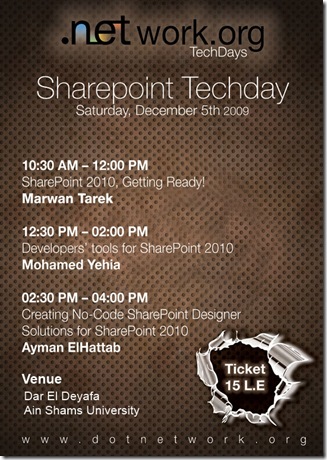
Egypt SharePoint User Group is pleased to announce its co-operation with DotNetWork User Group in putting together a full day about SharePoint 2010.

23


TechDays is a new type of .network’s gatherings. It consists of 2+ sessions talking about a specific technology from the basic to advanced levels going in sequence to expose audience to different areas of that technology.

I’m pleased to be presenting there with Marwan Tarek and Mohamed Yehia, please find below the event details :

Date: Saturday, December 5th 2009
Time: 10:30 AM – 4:00 PM
Place: Dar El Deyafa – Ain Shams University – Isis Hall – first floor, El khaleefa el Mamoon – EL Abbasia– Cairo
Agenda:
10:30 AM – 12:00 PM SharePoint 2010, Getting Ready! Marwan Tarek
12:30 PM – 02:00 PM Developers’ tools for SharePoint 2010 Mohamed Yehia
02:30 PM – 04:00 PM Creating No-Code SharePoint Designer Solutions for SharePoint2010 Ayman ElHattab
The ticket to attend the event is 15 L.E.

Hope to see you all there!

Jordan SharePoint User Group – Nov 2009 Meeting

Jordan SharePoint User Group has recently conducted November 2009 meeting on Wednesday, November 11, 2009 at Princess Sumaya University for Technology.

21 22


Mohamed Saleh [C# MVP] and Ali Nimer, Sr. SharePoint Developers delivered exciting sessions covering how to build browser-enabled web forms using Microsoft InfoPath Forms Services

Here are some of the covered topics:

· What is InfoPath and how does it work
· How to get InfoPath to work with SharePoint InfoPath Forms Services
· InfoPath or ASP.NET Web Forms?
· Consuming Web Services from InfoPath Forms
· Business Rules Verification and Validations

About JSUG :

The Jordan SharePoint User Group (JSUG) is the very first SharePoint User Group in the Middle East. It was formed to connect SharePoint professionals within Jordan together, to share knowledge and build a higher level of awareness for SharePoint Products and Technologies within the region.

Looking forward for more collaboration between JSUG and EGYSUG…

In SharePoint Designer 2010 : XSLT List View Web Part = List View Web Part + XSLT Data View Web Part

XSLT Data View Web Parts have been and still remain to be one of the most powerful web parts in SharePoint , some people call it “The Swiss Army Knife of SharePoint Web Parts” , the only problem that I can see with the Data View Web Part that once you add it to a web part page, the end users cannot further manipulate it, they have to come back to SPD Designer to modify it or directly edit the XSLT from the browser which is not an easy task (All data is retrieved as XML and manipulated using XSLT which is a very flexible way of transforming and presenting your data). Otherwise, the XSLT Data View Web Part is a wonderful web part, you can aggregate data from a variety of sources and present them in an awesome way.

In SharePoint 2007, we also had List View Web Part, which could be used to show a list content in a page but you cannot customize it that much in SPD 2007, you have to convert it to XSLT Data View Web part in order to customize or extend it.

In SPD 2010, there is a new web part called XSLT List View Web Part which is a combination of both :

XSLT List View Web Part = List View Web Part + XSLT Data View Web Part

20


You can customize it directly through SPD 2010 and once it’s added to a page, end users can still customize it using the browser by adding views and doing anything that was possible using List View Web Part.

Ah, by the way the Swiss Army Knife of SharePoint Web Parts still exists in SharePoint Designer 2010 with a much better designer surface using the new Ribbons interface 🙂