All posts by Ayman El-Hattab

Ayman El-Hattab is a Technology Evangelist @ Nintex & a recognized industry expert focusing on helping organizations plan, design, develop, build, govern and operate enterprise collaboration solutions. You can follow Ayman on Twitter @AymanElHattab to stay updated on his upcoming activities.

Using external data in Excel Services [MOSS 2007]

Excel Services supports displaying data from external locations if those locations were configured as “Trusted”. Try creating a simple excel document with a Table that displays data from a SQL server table . Now try to view it in Excel Web Access. You will get the following error:

12

After some investigations, I found out that Excel services supports displaying data from external data sources, but not in a table format, only in a pivot table!

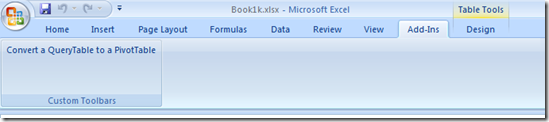
To work around this limitation, you need to convert your tables to pivot ones? How ? Download this tool and you are good to go !
13


For more info : http://blogs.msdn.com/b/cumgranosalis/archive/2006/11/03/query-tables-work-around-for-excel-services.aspx

http://msdn.microsoft.com/en-us/library/cc514223(office.12).aspx#MOSS2007TenTips_ConfiguringExternalDataConnections

Error when publishing to MOSS 2007 “This file cannot be saved to this location because there is no connection….”

esterday, I was playing with Excel Services on an old MOSS 2007 VM that has no network. When publishing an Excel Spreadsheet to Excel Services, I received the following error:

Microsoft Office Excel This file cannot be saved to this location because there is no connection to the server. Check your network connection and try again. ”

After some quick research, I found out that this problem is related to the System Event Notification Service. To work around this issue, I ran net stop sens from the command line.

10

Cool Stuff : All up Business Intelligence Demo – Release 9.2

Microsoft has developed a comprehensive Business Intelligence solution demo (version 9.2) using SQL Server 2008 R2, Microsoft Office 2010 and SharePoint 2010 technology. This solution enables Business Intelligence for everyone at Contoso (fictional company created by Microsoft) through familiar tools, self–service capabilities, and access to critical business information.

There are two ways to access this demo solution, online remote access to server configured by Microsoft or via configuring virtual machine locally.

The Demo Release 9.2 has been made available on the Microsoft Partner site for download.  There are 42 files in the download (around 29 GB in all, once extracted though over 80).  Need some serious RAM and of course Hyper-V for it to work.

Key Features:
• SharePoint 2010 Insights, PerformancePoint Services, Excel Services, Visio Services, Reporting Services, Search, Social Relevance, Communities, Team Sites, People Profiles, Blogs, Organizational Browser, Workflows
• Silverlight, integrated with Bing Maps for the Enterprise and SQL Server Analysis Services
• Office 2010 Web Applications, Excel Co-editing
• PowerPivot for SharePoint, Excel
• PowerPivot Management Dashboard
• Report Builder 3.0
• SQL Server 2008 R2 DB Engine

Get it from here: http://www.mssalesdemos.com

For more info : http://bisqlserver.rdacorp.com/2010/03/all-up-bi-demo-release-92.html

Microsoft SharePoint 2010 MCPD & MCITP Certifications

Last month, I took the beta exams for SharePoint Server 2010. Over the last week, the results for these have been declared. I’m really glad to say that I have passed the exams. That gives me the right to use the following logos:

6

7


8


For those who are not aware of SharePoint 2010 Certifications, Microsoft now offers two separate tracks namely MCPD for Developers and MCITP for IT Professionals each containing two exams. For more information about the exams and how to prepare yourself for them, check Razi’s post here.

More About Feature Scope

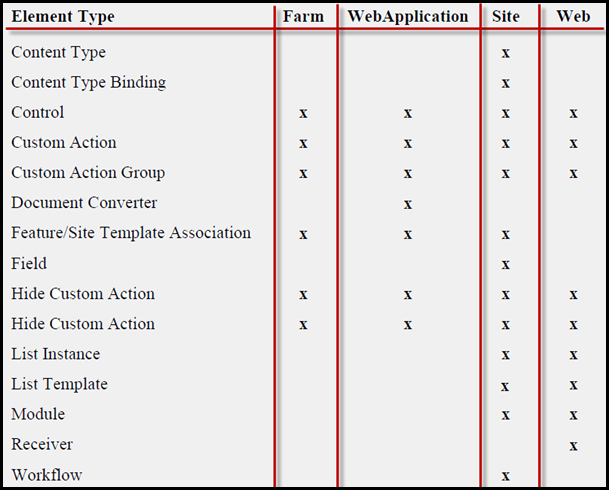
Features are scoped, this means that you can have a feature activated at the farm, web application, site collection (site) , or site level (web). When a feature is activated at a scope, it also affects subscopes, so if you use a web application–scoped feature to add a custom action somewhere, then every site collection and every site beneath the web application will have the same custom action.You can combine different elements within a single feature as long as the elements are of compatible scope.

The following table lists some feature elements and the available scopes for each.

4


As you might have noticed, some features are available at more than one scope and the scope you select will depend on the granularity you need. If you want to add a custom action to the Site Actions menu of every site in every Web application, you can set the scope of the feature in which the element is defined to Farm. If you want to affect a single web within a site collection, set the scope to Web. Other features are available at only one or two scopes. For example, site columns (Field element) and content types only allow Site scope while List Instances and List Templates allow Site and Web scopes.

This does lead to a bit of a challenge when you want to add a web-scoped list template where you add some custom fields, which are site-scoped. More about activation challenges later…

Note: This is an excerpt from a lecture that I teach at USPJA

Free USPJA Webcast – “How to Best Gather Requirements for SharePoint” by Dux Raymond

Poor requirements can be attributed to failed SharePoint implementations. The key to successful SharePoint implementation is properly developing requirements. A lot of people know that this is important, however, only a handful of folks truly understand what it takes to do this right.

In this presentation, you will learn key techniques in effectively eliciting, analyzing, prioritizing, validating and documenting requirements for SharePoint projects. 3
In addition, participants will be able to identify:
· Key components of requirements gathering process
· Why requirements traceability is paramount in defining ROI in SharePoint projects
· Why having a well defined business case is necessary to effectively initiate requirements gathering

The primary audience for this class are executives, managers, analysts, consultants who wish to properly implement SharePoint and immediately reap its’ organizational benefits.
Participants will get presentation notes, checklists, and templates.

It’s a great lecture, held by one of the true masterminds of SharePoint project management, Dux Raymond Sy.

Register here to attend:
https://www1.gotomeeting.com/register/729809009

If you want to learn more about USPJ Academy, please visit http://www.uspja.com/

USPJ Academy Faculty Meeting in Dubai

2Last weekend was a special one not only because it included my birthday or because I spent it in a luxurious hotel in Dubai but because it held the first official faculty meeting for USPJ Academy. I really had fun meeting the SharePoint heroes in the photo above. We had great time celebrating the academy launch, socializing and of course discussing lots about the teaching system in the academy. We came up with very interesting ideas, stay tuned!

Here’s the list of my fellow faculty members, along with links to their blogs.

Sahil Malik
Laura Docherty
Marc Anderson
Bjørn Furuknap
Christina Wheeler
Anil Sharma

Speaking tomorrow at Microsoft Technology Week

It might be a bit late, actually too late to announce it. I’ll be presenting tomorrow (June 16, 2010) at Microsoft Technology Week. The sessions will be held at Microsoft Egypt premise in Smart Village, Cairo. I’ll focus on SharePoint from the business perspective and the new features in SharePoint 2010. No code involved here. Oh, and attendance is free and no registration required.

Replacing Signout.aspx in SharePoint 2010

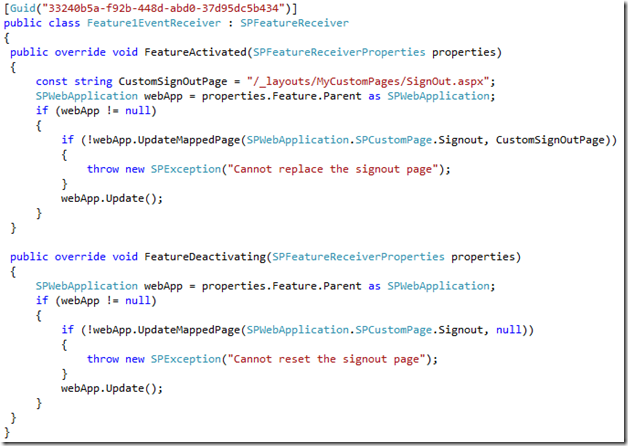
Yes, this was a common requirement in SharePoint 2007 and there wasn’t an easy and supportable approach to achieve that. Now in SharePoint 2010, it’s as easy as calling a method, specifying the page that you want to replace (for instance: Signout, error, access denied, ..) ,the URL of your new custom page and that’s it!

The following feature receiver replaces the default SignOut page with a custom one on activation and resets the SignOut page to the default one on deactivation.

1


You can also replace other pages like AccessDenied.aspx, Confirmation.aspx, Error.aspx, Login.aspx, ReqAcc.aspx, SignOut.aspx or WebDeleted.aspx by specifying a member of SPWebApplication.SPCustomPage enum.

Interesting, eh ?