All posts by Ayman El-Hattab

Ayman El-Hattab is a Technology Evangelist @ Nintex & a recognized industry expert focusing on helping organizations plan, design, develop, build, govern and operate enterprise collaboration solutions. You can follow Ayman on Twitter @AymanElHattab to stay updated on his upcoming activities.

TechEd Middle East Registration Opens

Registration is now open for TechEd Middle East 2011.  Tech·Ed is Microsoft’s premier technical education event providing the most 3comprehensive technical training on Microsoft’s suite of products, technologies, solutions and services and takes place in Dubai, March 8 – 10, 2011.

  • Hear about the future of Microsoft’s products and technologies directly from the Microsoft leadership team in the keynote
  • Choose from 200 technical sessions delivered by Microsoft and industry experts
  • Touch the technology through more than 40 PC-based instructor-led training labs
  • Ask your questions at the NEW Ask The Experts forum
  • Meet with product experts and see product demos at the Technical Learning Centre
  • Explore industry solutions at the Tech·Ed Expo

Benefit from the Super Saver registration fee of only $795 for all registrations before 31 December 2010.

www.teched.ae

Microsoft MEA Center of Expertise Blog

We are a 60+ technology enthusiasts helping Microsoft customers around Middle-East & Africa region. We bridge Microsoft tools & technologies to their businesses. Our aim is to solve customer business problems using Microsoft technologies.

And here is our blog: http://blogs.technet.com/b/meacoex/

1


2

Cairo PDC10/MS3arab Community Launch

Since 1991, the PDC has been the epicenter of Microsoft’s biggest platform announcements. This year will be no exception. Leading-edge developers and architects will gather in Redmond this October to hear firsthand from Microsoft’s leaders about the next 9generation of Microsoft developer technologies.

The PDC isn’t just about content and sessions – it’s an opportunity for you to get hands-on access to the latest technologies, have your questions answered by the people who conceived and built the technologies and plan the features and architecture to support your business goals. If you’re a developer, architect or technology leader involved in making strategic technology decisions for your company or organization, you can’t afford to miss the PDC.

Due to the overwhelming interest in the Redmond event, The MS3arab Community, under sponsorship ofCompuPharaohs are working with Microsoft Egypt,  to provide easier opportunity to attend a PDC10 event in Cairo-Egypt.

About MS3arab:

A new Microsoft Oriented Community. It has been founded by the Microsoft Regional Director-Middle East, Group of MVPs, as well as other industry geeks.

Register here

New features in Office Web Apps

Yesterday, Microsoft Office Web Apps team introduced very cool new features to the web apps (Word, Excel, PowerPoint and OneNote).

In a nutshell, the new features are :

  1. Now in Excel Web Apps, you can add line, bar, pie, and many other charts to your excel speadsheets just from the browser.
  2. Drag and copy formulas and data just as you do in Excel.
  3. View Excel spreadsheets on your mobile browser. (Similar experience to Word and PowerPoint on mobile).
  4. Insert Clip-arts to PowerPoint presentations (from office.com).
  5. Embed a PowerPoint presentation or Excel spreadsheet in a blog or website. With PowerPoint presentations, viewers can page through a mini version of the slides or view in full screen.
  6. Now you can open Office files on your desktop directly from SkyDrive. Microsoft added this feature after seeing that over 90% of the Office documents on SkyDrive are created in Office on the desktop. Making it easier to work with those files just makes sense.

For more about the new features, demos and videos, refer to this post.

Indexing files larger than 16 MB in SharePoint 2010

Tonight, I came across an interesting blog post by Fellow MVP, Todd Klidnt in which he explains how to work around the 16 MB limitation for file indexing in SharePoint 2010 using PowerShell.

“As with previous versions of SharePoint, SharePoint 2010 will not index the contents of files larger than 16 MB. There are a couple of reasons for this such as network usage pulling large files across and the time it takes to break them apart”. Click here to continue to the post.

SPQuery to External List ignores the RowLimit attribute

Using CAML Queries is the only supported way to query external lists. It comes in very handy If you want to retrieve external data within a sandboxed application, without using a full-trust proxy. However using CAML Queries with external lists comes with some gotchas. Consider the following snippet :

SPQuery query = new SPQuery();
query.Query = “<Method Name=’ReadList’ />” +
“<OrderBy><FieldRef Name=\”CustomerID\”/></OrderBy>” +
“<RowLimit Paged=\”TRUE\”>10</RowLimit>” +
“<Aggregations Value=\”Off\”/>”;

SPListItemCollection items = lstCustomers.GetItems(query);

Unfortunately, this query just ignores the RowLimit and returns all the data from the external data source and not only the first 10 items as specified in the query. This is a known issue!

For more information :

http://social.technet.microsoft.com/Forums/en-US/sharepoint2010programming/thread/7a86ba74-ea19-42f3-bde9-690542c84552

Browsing PowerPivot Generated Cubes in SQL Server Management Studio

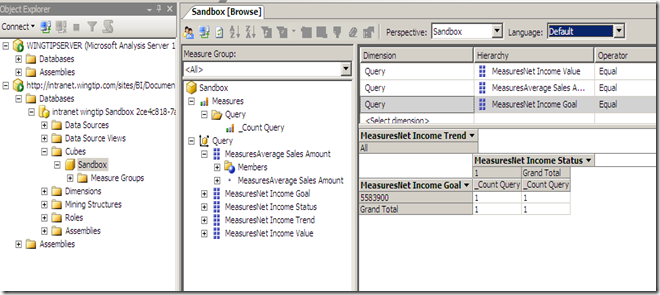
When publishing Excel Workbooks that contains PowerPivot objects, a real Analysis Services cube is generated on the fly, you don’t believe me?

1. Install the PowerPivot Add-in for Excel 2010 and use it to create a workbook.

2. Publish the workbook to a document library which is marked as a trusted data source (Unlike MOSS 2007, All SharePoint sources are trusted by default in SharePoint 2010 as shown below).

6


3. Open SQL Server Management Studio, click Connect > Analysis Services and type the URL of the workbook you just published and click Connect.

7


8


Interesting, eh ?


Presenting tomorrow : “Delivering Business Intelligence Using SharePoint 2010 Excel Services”

Tomorrow, I’ll be presenting @EgyGeeks online UG. I’ll speak about SharePoint 2010 Excel Services from both the technical and the business perspective. If you have any questions or if you need me to cover anything related to Excel Services, don’t hesitate to leave me a comment here.

For more info, follow the hashtag #EgyGeeks on twitter.

Excel Services limitations and workarounds

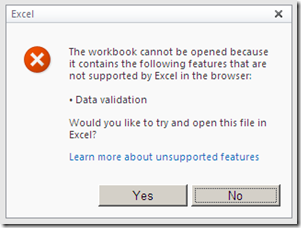
Yesterday, while presenting about Business Intelligence using SharePoint 2010 Excel Services, we came across the data validation limitation. NOTE: Excel Access Web Part refuses to load a published Excel workbook that contains Data Validation.

5

Here are couple of interesting articles that are worth reading:

1) A PivotTable Trick That Brings Data Validation to Excel Serviceshttp://blogs.msdn.com/b/excel/archive/2008/02/13/a-pivottable-trick-that-brings-data-validation-to-excel-services.aspx

2) Unsupported Features in Excel Services
http://msdn.microsoft.com/en-us/library/ms496823.aspx

Cannot Refresh or Filter Data in Published Workbooks [Excel Services – SharePoint 2010]

As shown in the screenshot below, I was trying to consume data from SQL Server Analysis Services cube using Excel 2010 Pivot Table.

1

Refreshing and filtering data worked as expected on the client but when I published my workbook to Excel Services, filtering and slicing produced the following error

2

“The data connection uses Windows Authentication and Excel Services is unable to delegate user credentials.”
Of course, the workbook existed in a trusted location and the external data connection file resided in a trusted connection library.

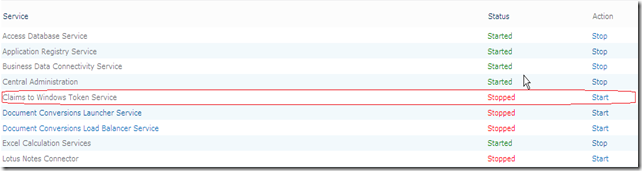
To solve this issue, I navigated to the Central Administration and started “Claims to Windows Token services” as shown below :

3

4


This allowed me to refresh data using Windows Authentication…