If you are following me on Twitter, you have most probably seen my tweets yesterday about the official launch of MEA ALM Community (Middle East & Africa Application Lifecycle Management Community). Beside being a co-founder and community lead, I’ll be assuming the role of “SharePoint Practice Lead” and will be focusing on SharePoint as a development platform as well as the best practices for building SharePoint solutions using Microsoft Visual Studio ALM tools.
I’m shooting for December 2012 to create a series of videos in Arabic & English to explain how to use Visual Studio 2012 Testing tools for SharePoint.
TechEd is Microsoft’s premier technology conference for IT professionals and developers, offering the most comprehensive technical education across Microsoft’s current and soon-to-be- released suite of products, solutions, tools, and services.
TechEd North America 2012 particularly was very special to me because it featured many sessions about SharePoint Development & Testing. I’ve compiled below a list of the must-watch videos for SharePoint Developers, Testers & Architects :
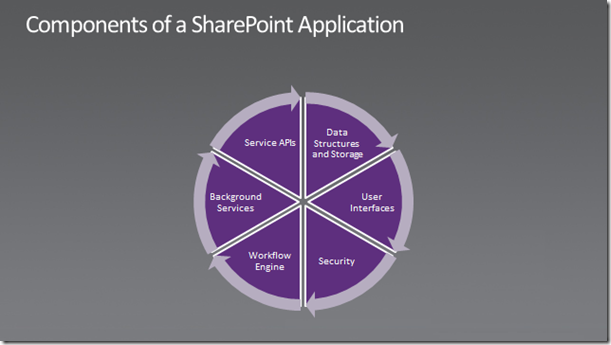
I have been asked this question several times during the last month and I have tried to shed some light on that during my session at OpenDoor Egypt. Today, I stumbled upon a good MSDN article that concisely answers this question :
Get up to speed on all the latest tools available to enhance
your skills and create new, innovative solutions.
Develop your network
Meet and interact with industry leaders and professionals. Share
and exchange tips on development, generate ideas and establish relationships.
Develop new solutions
Discover how you can get more value out of your existing tools and
deliver superior solutions through in-depth discussions and demos.
Don’t miss this exclusive event.
Introduction to SharePoint Development
Date: Wednesday October 27, 2010
Time: 10:00 am – 3:00 pm
Presenter: Ashraf MansourPlace: Microsoft Egypt Building in Smart Village
Description:
Learn to develop for SharePoint Server 2010 using Visual Studio 2010, with demos on developing a sample custom workflow and a sample web part.Seats are limited, to confirm your attendance, please reply back tomohamedw@microsoft.com
Using CAML Queries is the only supported way to query external lists. It comes in very handy If you want to retrieve external data within a sandboxed application, without using a full-trust proxy. However using CAML Queries with external lists comes with some gotchas. Consider the following snippet :
Unfortunately, this query just ignores the RowLimit and returns all the data from the external data source and not only the first 10 items as specified in the query. This is a known issue!
Excel Services supports displaying data from external locations if those locations were configured as “Trusted”. Try creating a simple excel document with a Table that displays data from a SQL server table . Now try to view it in Excel Web Access. You will get the following error:
After some investigations, I found out that Excel services supports displaying data from external data sources, but not in a table format, only in a pivot table!
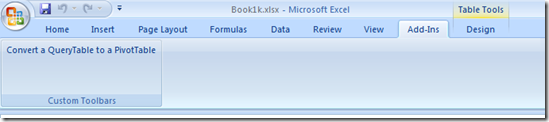
To work around this limitation, you need to convert your tables to pivot ones? How ? Download this tool and you are good to go !
esterday, I was playing with Excel Services on an old MOSS 2007 VM that has no network. When publishing an Excel Spreadsheet to Excel Services, I received the following error:
“Microsoft Office Excel This file cannot be saved to this location because there is no connection to the server. Check your network connection and try again. ”
After some quick research, I found out that this problem is related to the System Event Notification Service. To work around this issue, I ran net stop sens from the command line.
Quick-Hit Technology Thoughts from a Territory Manager @ Nintex, Microsoft Regional Director and 6x Microsoft MVP







 Ayman El-Hattab's Technology Blog